Disclosure & methodology: This comparison is published by Awaio. We evaluated each platform using publicly available product documentation, vendor websites, and published customer reviews, scoring them on hardware requirements, platform breadth, deployment needs, and calendar support. Competitor features and pricing are accurate to the best of our knowledge as of October 2026; always confirm current details with each vendor.
Key takeaways
- Choose Awaio if you want wayfinding, desks, rooms, lockers, and parking in one app, with no sensor installation required.
- Choose OfficeSpace if you want workplace navigation connected to space planning and real estate decisions.
- Choose CXApp or Nimway if you need beacon-based indoor positioning and can budget for the hardware.
At 8:55, a product manager steps out of the lift, checks her calendar, and realises she has no idea where room 4C is. Neither does anyone by the coffee machine. Her team booked desks somewhere on this floor (or maybe the next one), and the colleague she came in to see hasn’t answered the chat.
Multiply that by every employee, every office day.
Hybrid work took away the fixed desk, and with it the muscle memory that used to get people through the building. Seating is unassigned, teams come in on different days, and on multi-floor campuses the floor plan shifts every time a department grows or moves.
Wayfinding software can fix that. The more complicated question is how you buy it.
Some tools sell wayfinding on its own, often paired with sensors and kiosks that report where people sat yesterday. Others build it into a platform that also books desks, rooms, lockers, and parking, so the map knows what’s free and who’s coming in.
So before you book a demo, settle one question: do you want wayfinding as a standalone tool, or as one layer of a platform that also runs your bookings?
Below, we compare six platforms side by side and score each one on hardware independence, platform breadth, deployment speed, and mixed Microsoft and Google calendar support.
Here’s the short version:
- Awaio: Best for teams who want wayfinding bundled with desk, room, locker, and parking booking in one app, with no sensor or kiosk installation.
- OfficeSpace: Best for enterprises that want wayfinding tied into AI-powered space planning and real estate portfolio decisions.
- Eptura: Best for large enterprises already standardised on Archibus/Serraview and needing wayfinding as part of a broader IWMS.
- Appspace: Best for companies that want wayfinding delivered through digital signage and an intranet/employee-comms platform.
- CXApp: Best for multi-building corporate campuses needing beacon-based indoor positioning (the “blue dot” experience) for visitors and staff.
- Nimway: Best for Nordic companies already invested in Sony-ecosystem meeting room hardware who want wayfinding on top of it.
What Is Workplace Wayfinding Software?
Workplace wayfinding software helps employees and visitors find their way around an office. Users can easily find the desk they booked, the room their meeting is in, and the colleague they came in to see.
The coolest part: It replaces static signs and printed floor plans with interactive maps that update the moment the office changes.
When shopping for wayfinding software, look for these five core capabilities:
- Interactive floor plans: Visual maps of office layouts, floors, and destinations.
- People, room, and desk search: Tools for locating colleagues, meeting rooms, desks, and workplace resources.
- Mobile-first access: Navigation through smartphones, QR codes, or other supported access methods.
- Booking integration: Live desk and room availability, with booking from the map.
- Multi-site support: Navigation across multiple floors, buildings, and office locations.
Here’s what most vendors won’t lead with: digital wayfinding doesn’t require dedicated hardware. Sensors, beacons, and kiosks are deployment choices, and plenty of offices run without them. Whether you need them depends on the size of your building and how precise directions have to be.
If you only need maps and directions, software alone will do. If you need a live “blue dot” or a kiosk in reception, budget for the hardware that comes with it.
2026 Workplace Wayfinding Software Comparison Table
Here’s how the six platforms in this guide compare at a glance:
| Platform | Best for | Pricing | Notable limitation or differentiator |
| Awaio | Teams combining wayfinding with desk, room, locker, and parking bookings | Office map from €190 one-off per floor; QR signs €39 each | Hardware-free by default; Bluetooth locks are the only hardware |
| OfficeSpace | Teams connecting navigation with space management and real estate decisions | Contact for pricing | Move management and scenario planning |
| Eptura | Enterprises using Archibus, Serraview, or broader workplace management systems | Contact for pricing | Wayfinding inside an existing Archibus or Serraview IWMS |
| Appspace | Organisations combining wayfinding with digital signage and employee communications | Free plan; paid tiers on request | Maps, signage, and intranet on one platform |
| CXApp | Multi-building corporate campuses using indoor positioning | Contact for pricing | Turn-by-turn blue-dot navigation; needs beacons |
| Nimway | Organisations using Sony’s workplace technology ecosystem | Contact for pricing | Sony indoor positioning; needs beacons and occupancy sensors |
And here’s how we’ve scored these tools:
Evaluation Scorecard
Each platform is scored from 1 to 5 on four criteria. Sort by any criterion to see who leads where.
| Awaio Featured 19 / 20 overall | Hardware independence 4/5 Hardware-free by default, but digital locker access uses Bluetooth locks. | Platform breadth 5/5 Combines wayfinding, desk, room, locker, and parking management. | Deployment speed 5/5 Deploys wayfinding and desk and room booking in days, with no sensor or panel installation. | Microsoft + Google Calendar 5/5 Supports mixed Outlook and Google Calendar environments, a rare combination in this category. |
|---|---|---|---|---|
| OfficeSpace 13 / 20 overall | Hardware independence 3/5 Hardware needs vary with the kiosks and displays chosen. | Platform breadth 4/5 Desks, rooms, visitors, moves, and asset tracking in one platform. | Deployment speed 3/5 G2 reviewers report about two months to implement. | Microsoft + Google Calendar 3/5 Integrates with Microsoft and Google calendars, with less emphasis on mixed environments. |
| CXApp 13 / 20 overall | Hardware independence 3/5 Beacon-based positioning requires additional hardware. | Platform breadth 4/5 Live map of desks, rooms, and amenities across buildings and campuses. | Deployment speed 3/5 Beacon installation can increase setup time. | Microsoft + Google Calendar 3/5 Published materials focus on maps and occupancy rather than calendar sync. |
| Appspace 12 / 20 overall | Hardware independence 3/5 Signage needs screens, but maps and booking also run on phones. | Platform breadth 3/5 Combines signage, intranet, and communications. | Deployment speed 3/5 Setting up the intranet, maps, and integrations takes time. | Microsoft + Google Calendar 3/5 Books from Microsoft Teams, with Webex and Slack integrations. |
| Eptura 11 / 20 overall | Hardware independence 2/5 Badge, sensor, and kiosk integrations are central to how it works. | Platform breadth 4/5 Desk, room, parking, and service booking inside a full IWMS. | Deployment speed 2/5 Enterprise IWMS rollouts span multiple admin portals. | Microsoft + Google Calendar 3/5 Microsoft-first, with Google Calendar support available. |
| Nimway 9 / 20 overall | Hardware independence 2/5 Indoor positioning relies on Bluetooth beacons and occupancy sensors. | Platform breadth 3/5 Positioning, desk and room booking, and colleague finding. | Deployment speed 2/5 Beacon and sensor installation extends deployment. | Microsoft + Google Calendar 2/5 Little published detail on mixed Microsoft and Google calendar support. |
Here’s a closer look at each tool.
1. Awaio: Best for hardware-free wayfinding and workplace booking in one app
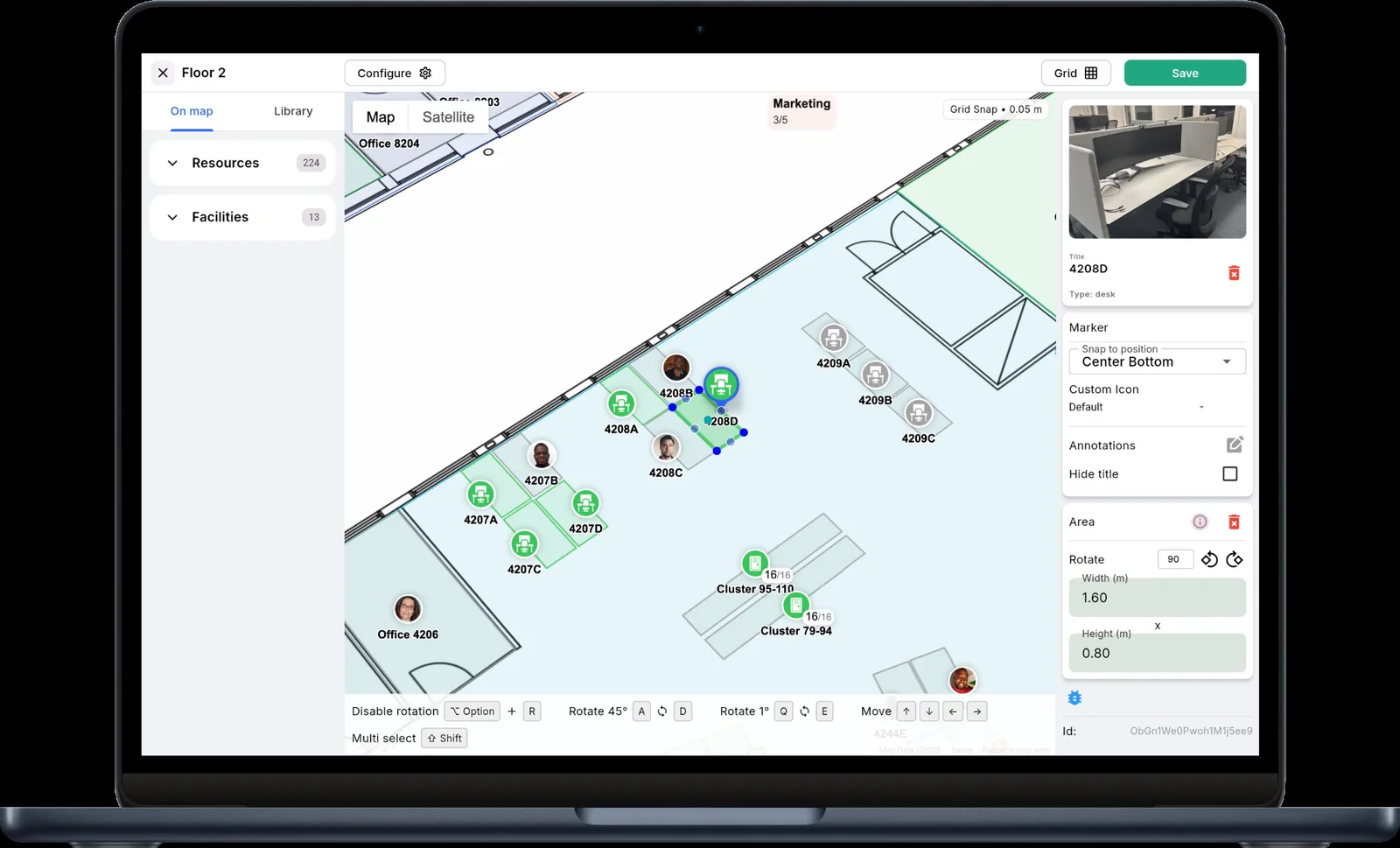
Picture an employee stepping out of the lift. They scan the QR code on the wall, the floor plan opens on their phone, and they can see which desks are free, where their team is sitting, and which meeting room is theirs.
That’s Awaio’s approach: wayfinding as one layer of a platform that also runs desks, rooms, lockers, and parking. One platform and one app, not ten.
Beyond optional QR signs and NFC tags, there’s nothing to mount on the walls, and no sensors or kiosks by default. Employees use the phones they already carry. And because Awaio runs on bookings, it shows where people will be tomorrow, while sensor-based systems report where they were yesterday.
Explore Awaio’s interactive office wayfinding.
Key Features
Interactive Floor Plan & Real-Time Colleague Search
Employees can search for a colleague, desk, or meeting room and see exactly where it sits on the map, with booking status alongside. Navigation lives inside the same app they use to book, so nobody switches between tools to plan their day.
QR/NFC-Based Navigation
QR codes and NFC tags sit on existing signage in place of digital panels. One scan opens the live floor plan and booking status on the employee’s own phone, with no kiosks or positioning sensors to buy, power, or maintain.
Sweco uses this setup across Veksthuset, its multi-floor Oslo headquarters.
Booking Integration
Wayfinding and booking share one map.
Employees see which desks, rooms, lockers, and parking spaces are free and book them in the same view. (Instead of checking one app for directions and another for availability.)
Take Norwegian Property Group: after switching to Awaio, it cut administration by 95%, and space utilisation went up.
For more on the booking side, see our guides to desk sharing software and meeting room booking software.
Multi-Site & Multi-Calendar Support
Awaio works with Outlook Calendar and Google Calendar, including mixed environments where teams use both. Admins manage floor plans and bookings for every office from one platform.
Science Park Jönköping, for instance, runs shared meeting rooms, desks, and lockers for 500+ people across 100+ companies on Awaio. Its Outlook add-in lets companies on separate Microsoft tenants book from the same pool of rooms.
See Awaio’s floor plans and booking in action.
Use Case Examples
Here’s how Awaio works in three very different settings:
New-hire onboarding at a multi-floor HQ: Sweco Oslo
Sweco rolled out Awaio at Veksthuset, its multi-floor Oslo headquarters, in days, without installing sensors or panels. New and returning employees use their phones to find their way around, locate colleagues, and book desks and rooms.
Sweco also uses Awaio Locks to manage personal lockers, team storage, changing rooms, and shared cabinets, replacing physical keys and RFID cards.
Security-conscious deployments: Saab Kockums and Kongsberg
Saab Kockums deployed Awaio in days without sensor or panel installation, and Kongsberg also relies on the platform. For defence and maritime organisations, where security reviews can stall a rollout, that’s a strong vote for Awaio’s defence-grade security.
Sweden’s top-rated hybrid HQ: Mölnlycke Health Care
Mölnlycke Health Care designed its global headquarters at GoCo Health Innovation City around hybrid work, with everything from personal and team lockers to parcel delivery and bicycle storage bookable in Awaio. The headquarters also scored 78.9/100 in the Leesman workplace experience survey, ranking first in Sweden.
Technical Specifications
Awaio runs in the cloud. Employees open interactive floor plans through QR codes and NFC tags, and bookings sync with Outlook and Google Calendar.
Its Bluetooth locks add digital access control for storage and fit existing or new cabinets without power, cables, or IT integration. Admins get live visibility into storage usage and availability. Its security is defence-grade, with deployments at Saab Kockums and Kongsberg.
Pros
- Hardware-free deployment in days, with no sensors or kiosks required.
- Supports mixed-calendar environments, including Outlook and Google Calendar, a combination Awaio co-founder Niclas Eglinger describes as “quite unique.”
- Lets you start with smart lockers, then add desks, rooms, and wayfinding in the same app as needs grow.
- Shows where people will be, based on bookings, while sensor-based tools report where people were.
- Connects wayfinding with desk, room, locker, and parking management.
- Consolidates workplace workflows in one app, beyond navigation alone.
Cons
- Wayfinding is one module within a broader platform, which may be more than buyers need if they want a lightweight, standalone solution.
- Bluetooth locks remain a physical hardware layer, so Awaio isn’t entirely hardware-free.
Pricing
Awaio publishes its pricing, which is rare in this category. Every module includes unlimited users:
- Wayfinding: €190 per floor (one-off), set up from a PDF or DWG floor plan
- Desk management: from €69/month for up to 20 desks
- Room booking: €10.90 per room per month
- QR signs: €39 each (optional)
A self-serve pilot is also available.
Explore Awaio’s wayfinding product.
Why teams choose Awaio
Awaio is for teams that need booking, wayfinding, and lockers in one app. Employees book a desk or room before they come in, scan a QR code to find it, and unlock their locker when they arrive. There are no sensors or kiosks to install.
2. OfficeSpace: Best for enterprises that want wayfinding tied into AI-powered space planning and real estate portfolio decisions
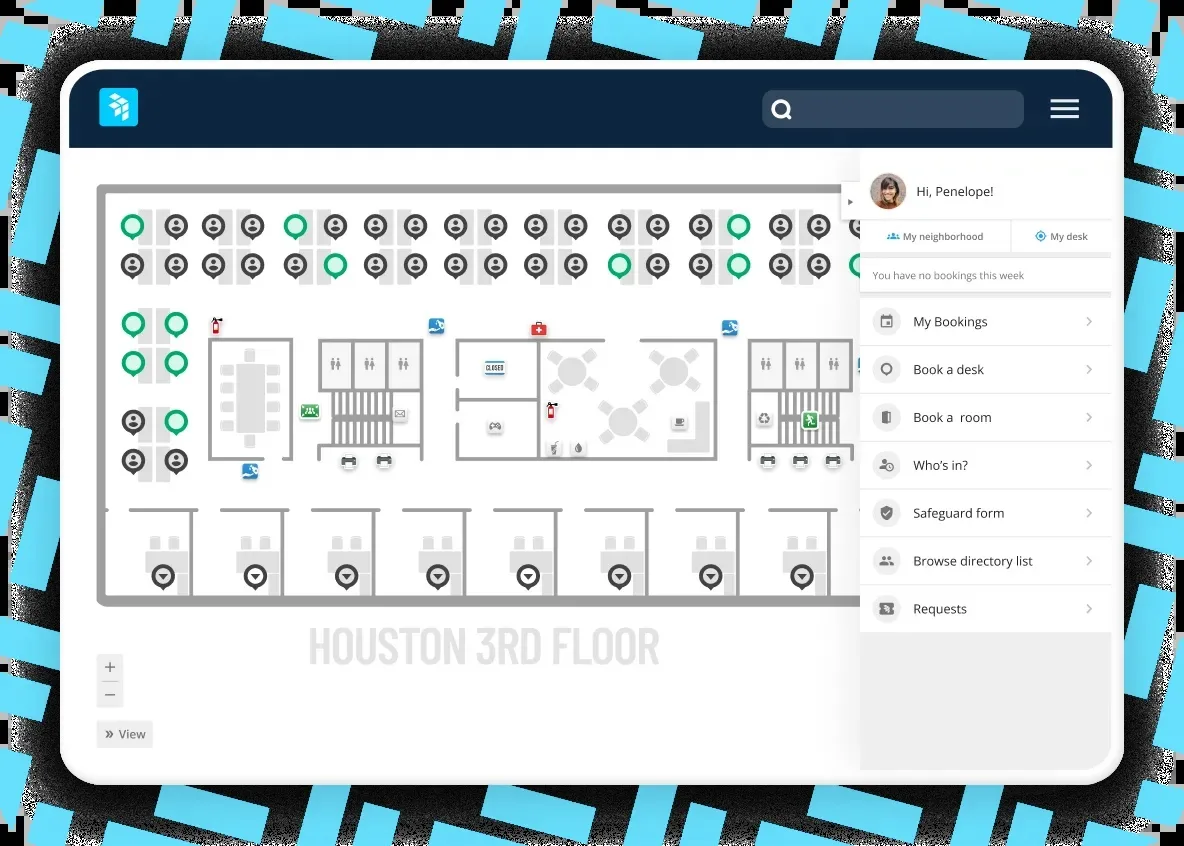
OfficeSpace is built for enterprises that treat office space as a portfolio to plan. Wayfinding is one feature in a platform designed around moves, reorgs, and real estate decisions.
Ratings for OfficeSpace (as of October 2026): 4.7/5 on G2 (128 reviews) and 4.8/5 on Capterra (61 reviews).
Key Features
- AI agents for space planning and usage analytics, added after its October 2025 acquisition of Dojo AI
- Wayfinding alongside desk booking, room booking, visitor management, and asset tracking
- Move management and scenario planning to model a reorg before anyone moves
User Reviews
- Admins can generate occupancy reports and identify office trends without friction (G2 reviewers).
- Admins find it easy to manage multiple sites at once (G2 reviewers).
Pros
- Strong fit for frequent office moves, since teams can model a reorg on the floor plan before anyone changes desks.
- Ties occupancy data to real estate decisions, which helps teams managing large portfolios.
- AI agents answer space planning and usage questions without a separate analytics tool.
Cons
- G2 reviewers report about two months to implement, plus a learning curve for occasional users.
- Pricing is quote-only, and the OfficeSpace Studio floor plan editor is a paid add-on.
Pricing
Contact OfficeSpace for pricing.
Why teams choose OfficeSpace
Pick OfficeSpace when wayfinding is one part of a bigger job. (Like planning moves, modelling reorgs, and backing real estate decisions across a large portfolio.)
3. Eptura: Best for large enterprises already standardised on Archibus/Serraview and needing wayfinding as part of a broader IWMS
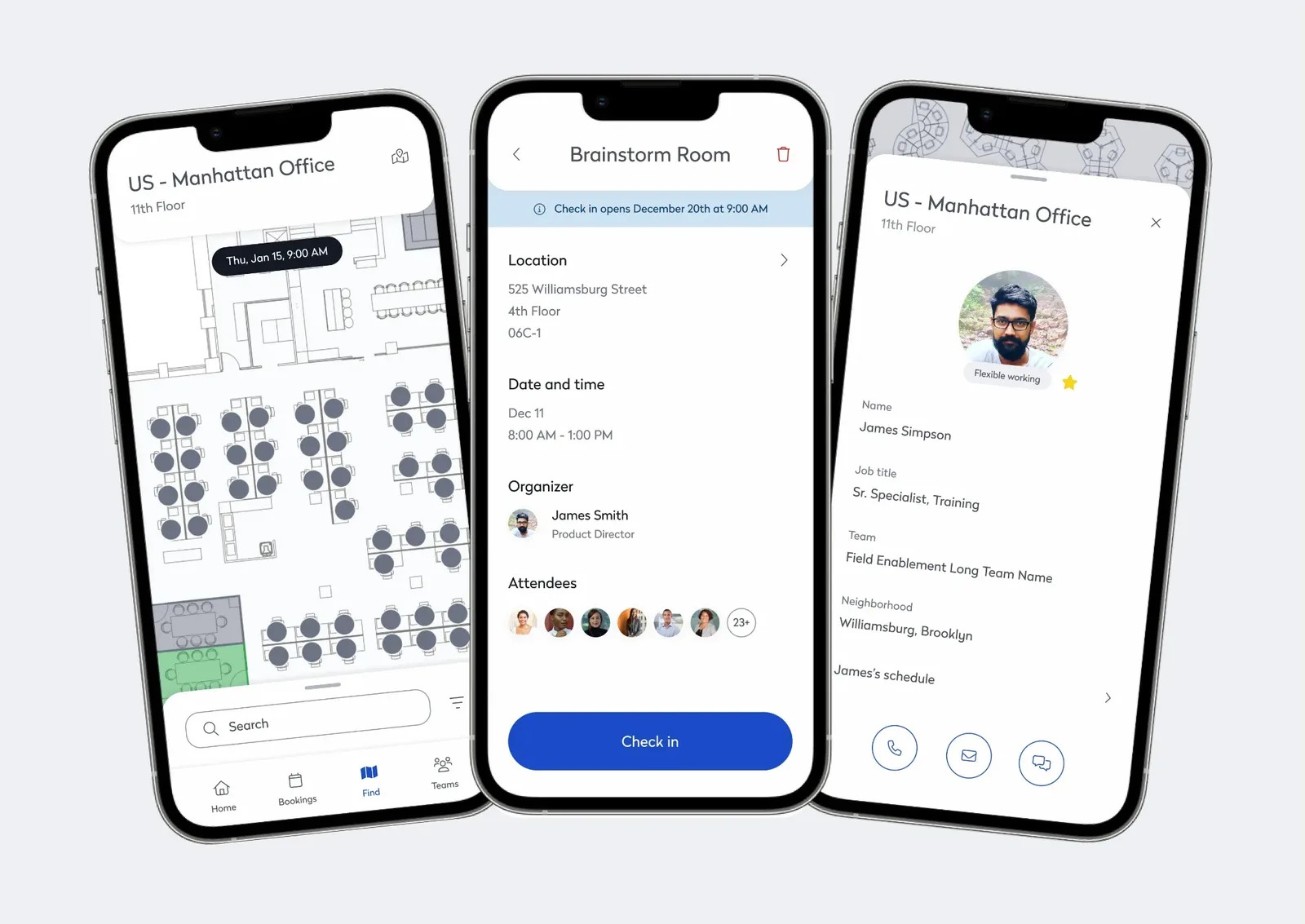
Eptura is the natural pick for large enterprises already running Archibus or Serraview as their integrated workplace management system (IWMS). Wayfinding sits inside the same system that already holds the organisation’s floor plans and facilities data.
Ratings for Eptura Engage (as of October 2026): 4.3/5 on G2 (179 reviews) and 3.9/5 on Capterra (72 reviews).
Key Features
- Desk, room, parking, and service booking from Outlook, Teams, and Copilot through Eptura Engage (formerly Condeco)
- Interactive wayfinding kiosks, plus workplace data in Power BI for portfolio reporting
- Badge and sensor check-in that confirms or releases bookings automatically
Pros
- Employees book from Outlook, Teams, and Copilot, so Microsoft-first teams don’t need another app.
- Badge and sensor check-in keeps booking data accurate at enterprise scale.
- Fits organisations with established Archibus or Serraview environments.
Cons
- Microsoft-first: Google support is more limited, there’s no native Slack app, and admin work spans multiple portals.
- Quote-only pricing aimed at large enterprises, so it can be more than a mid-sized office needs.
Pricing
Contact Eptura for pricing.
Why teams choose Eptura
If your organisation already runs Archibus or Serraview on Microsoft 365, Eptura lets wayfinding slot into systems you’ve standardised on.
4. Appspace: Best for companies that want wayfinding delivered through digital signage
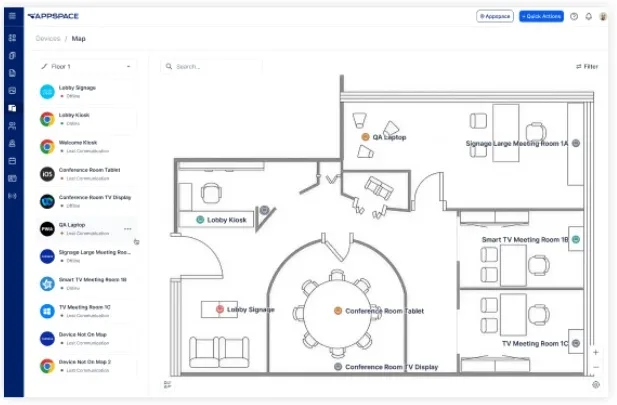
Appspace suits companies that want workplace wayfinding alongside digital signage, intranet, and employee communications. It works best where screens and the intranet already carry most workplace information across offices.
Ratings for Appspace (as of October 2026): 4.7/5 on G2 (157 reviews) and 4.7/5 on Capterra (25 reviews).
Key Features
- Intranet with news feeds, messaging, and approval workflows, plus built-in visitor management
- Interactive maps showing room layouts, meeting room technology, and nearby teammates
- Digital signage with templates and employee-submitted notifications
Pros
- Maps, signage, intranet, and visitor management share one platform, so information reaches people on screens and phones.
- Visitor management is included as standard rather than sold as an add-on.
- Fits organisations already using screens to share workplace information.
Cons
- Setting up the intranet, maps, and integrations takes time, so expect a learning curve.
- Paid tiers aren’t priced publicly, so budgeting starts with a sales conversation.
Pricing
Appspace offers a free plan (two premium users and one device) plus Express and Enterprise tiers priced on request. A 60-day free trial includes Enterprise features.
Why teams choose Appspace
For offices where the screens and the intranet matter as much as the map, Appspace puts all three on one platform.
5. CXApp: Best for multi-building corporate campuses needing beacon-based indoor positioning
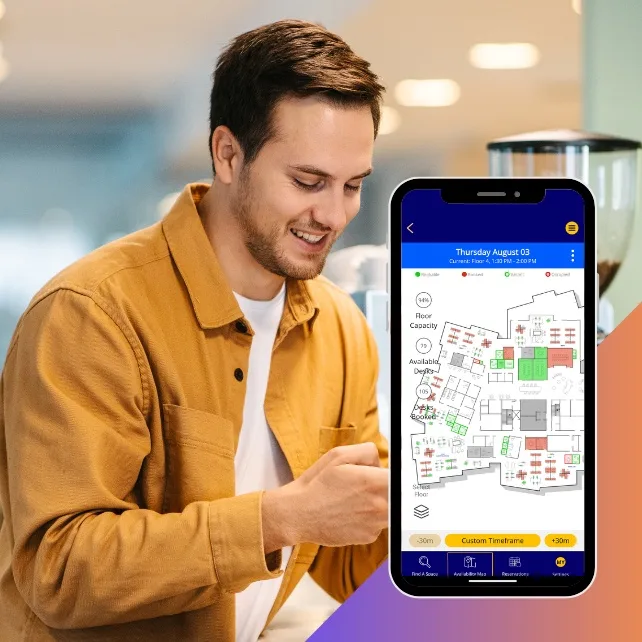
CXApp is built for multi-building corporate campuses where people need a live blue dot to find their way.
That blue dot sets it apart from tools that only display floor plans: people can see where they are in the building as they walk to their destination.
Ratings for CXApp (as of October 2026): not rated yet on G2 or Capterra.
Key Features
- One Map Experience (launched March 2026), a live map of desks, rooms, and amenities across buildings and campuses
- Real-time occupancy that shows which spaces are in use, plus booking straight from the map
- Turn-by-turn indoor wayfinding to workspaces, colleagues, and amenities
- Runs on mobile, desktop web, and on-site kiosks
Pros
- Works across mobile, web, and on-site kiosks, so visitors and staff can navigate without one fixed device.
- Turn-by-turn directions help people find their way across large, multi-building campuses.
- Live occupancy shows which spaces are in use, beyond what’s been reserved.
Cons
- One Map Experience launched in March 2026, so it has a short track record.
- Blue-dot positioning means installing beacons around the building.
Pricing
Contact CXApp for pricing.
Why teams choose CXApp
Teams choose CXApp when the campus is big enough that people need turn-by-turn directions, and they’re ready to install the beacons that make it work.
6. Nimway: Best for Nordic companies already invested in Sony-ecosystem
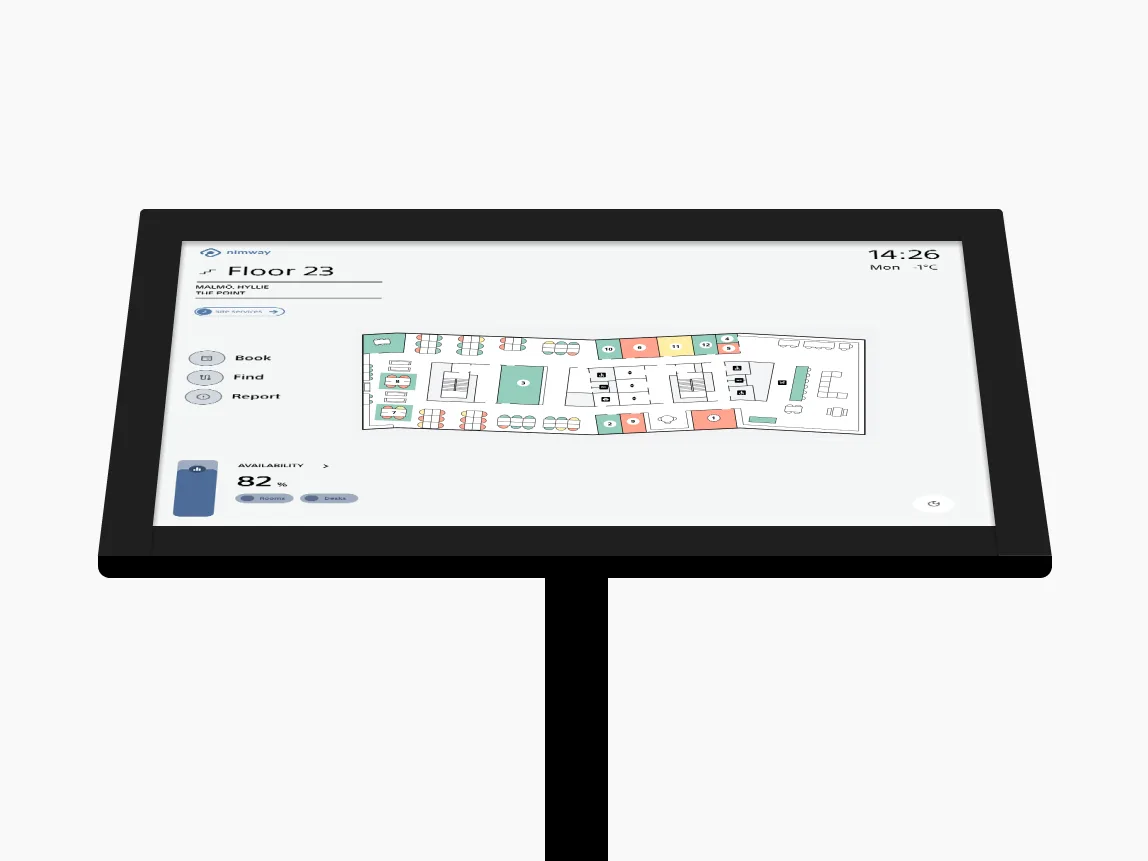
Nimway, from Sony, suits Nordic organisations that want indoor positioning built into their meeting-room setup. It uses Bluetooth beacons and wireless occupancy sensors to guide people to meetings, find free rooms, and locate colleagues. It also handles desk and room bookings.
Ratings for Nimway (as of October 2026): not rated yet on G2; 4.7/5 on Capterra (6 reviews).
Key Features
- Bluetooth beacons and wireless occupancy sensors for location and room-usage data
- Digital floor plans placed at hotspots around the building
- Desk and room booking, plus colleague finding
- Built on Sony’s indoor positioning engine
Pros
- Indoor positioning guides people to meetings and helps them locate colleagues.
- Occupancy sensors give facilities teams room-usage data alongside bookings.
- Backed by Sony’s indoor positioning engine and R&D.
Cons
- Indoor positioning depends on installing beacons and sensors throughout the building.
- Strongest fit for Nordic offices that want sensor-based positioning.
Pricing
Contact Nimway for pricing.
Why teams choose Nimway
Nimway makes the most sense for Nordic offices that want sensor-based indoor positioning and are ready to install the beacons and sensors it relies on.
Types of Workplace Wayfinding Software
Workplace wayfinding comes in three flavours: physical signage, digital kiosks and screens, and app-based navigation tied to booking. What separates them is where people get directions and whether those directions know what’s available.
1. Static and Physical Signage
Printed maps, directional signs, and floor labels are cheap and need no infrastructure. (They also go out of date the day the seating plan changes, and they can’t tell anyone which desk is free. )
2. Digital Kiosk-and-Signage Systems
Interactive kiosks and screens, usually in reception or at building entrances, give people on-screen maps and directions. Some double as channels for news and announcements.
OfficeSpace and Eptura offer this within wider workplace management platforms, while Appspace pairs maps with digital signage and its intranet. Before you buy, check that directions also work on phones, and budget for installing and maintaining the screens.
3. App-Based and Booking-Integrated Wayfinding
Mobile wayfinding puts the map on the phone in everyone’s pocket. Booking-integrated platforms take it a step further by linking directions to desk and meeting room reservations.
Awaio opens its floor plans through QR codes and NFC tags, with no sensors or kiosks by default. CXApp also runs on mobile, adding beacon-based blue-dot navigation.
Indoor positioning helps people find a resource, while booking integration shows whether it’s available and lets them reserve it.
For organisations weighing office hoteling software, that link means one less tool to switch between.
There’s also a timing gap. Sensor-based systems show where people were, while booking-first platforms like Awaio show where people will be, so employees and facility teams can plan the day before anyone arrives.
What Features Should You Look for in Workplace Wayfinding Software?
Start with what employees need to do on an ordinary weekday, then work back to features and hardware.
Check each tool against these questions:
- Hardware requirements: Does deployment require beacons, sensors, displays, or other physical infrastructure?
- Implementation and support: What setup, configuration, maintenance, and ongoing support are required?
- Calendar compatibility: Does the solution support Microsoft, Google, or mixed-calendar environments?
- Booking integration: Does the map connect to resource availability and booking workflows?
- Interactive floor plans: Can employees find destinations across floors and buildings?
- Multi-site management: Can administrators manage multiple offices and floor plans?
- Search: Can they locate colleagues, desks, meeting rooms, and other resources?
- Mobile access: Can they navigate without relying on a fixed kiosk?
Weigh them against your office. A campus that needs turn-by-turn directions has different priorities from a hybrid office that mostly needs people to find a free desk near their team.
Hint: The right tool is the one employees open on a busy Monday without a reminder. To see how your space gets used once it’s live, explore workplace analytics software.
Choosing the Right Workplace Wayfinding Software
Your final decision comes down to two questions:
Do you want navigation as a standalone feature? Or as part of a platform that also manages desks, meeting rooms, lockers, and parking?
A standalone tool can work if all you need is to steer visitors from reception to a meeting room. But if employees already juggle one app for desks, another for rooms, and a third for directions, bringing it all together makes every office day simpler.
Awaio takes the platform approach: wayfinding and resource booking in one app, with no sensors or kiosks required by default. Because it runs on bookings, it shows where people will be, while sensor-based tools report where they were.
Getting lost is the smaller problem. The bigger one is app overload, and it adds up fast: one in five employees wastes 63 days a year to disconnected tools and fragmented workflows. For more on the cost of disconnected workplace systems, read “you’re doing workplace tech wrong.”
The fix starts with fewer apps.
When booking, wayfinding, and lockers live in one place, that product manager stepping out of the lift at 8:55 knows exactly where room 4C is (and which teammate is sitting near it).
See Awaio’s interactive office wayfinding in action.
Frequently Asked Questions About Workplace Wayfinding Software
What is office wayfinding software?
Office wayfinding software helps employees and visitors find their way around a workplace through digital maps, searchable destinations, mobile navigation, or interactive displays. The best platforms also connect those maps to desk and room booking, which matters more as hybrid work makes shared desks the norm.
How is digital wayfinding different from signage?
Signage tells people where things are. Digital wayfinding also tells them what’s available. Wayfinding signage and printed maps stay fixed, while a digital wayfinding system uses interactive maps, search, mobile apps, or kiosks that update as the office changes.
Does wayfinding software require sensors or beacons?
No. Some indoor navigation systems use sensors or beacons for live positioning (often called indoor positioning systems, or IPS), but many run on QR codes, NFC tags, and interactive floor plans instead. Awaio provides wayfinding without sensor or kiosk installation by default; only its Bluetooth locks, part of its wider platform, involve hardware.
Can wayfinding software integrate with desk and room booking?
Yes, on the right platform. Booking-integrated wayfinding shows availability on the map, so employees can find a desk or room and book it in the same step. When comparing tools, check that the map shows live availability, supports booking, and syncs with your calendars.
How much does workplace wayfinding software cost?
It depends on the vendor, licensing model, product scope, and hardware. Most vendors only quote on request; Awaio is an exception, with its wayfinding office map at a one-off €190 per floor. Whoever you talk to, ask for a quote that covers software, hardware, installation, configuration, and ongoing maintenance.
Is wayfinding software difficult to deploy across multiple offices?
It doesn’t have to be. Complexity grows with the number of locations, integrations, and pieces of hardware involved, so platforms that skip positioning hardware are usually faster to roll out.
Ask each vendor for a deployment plan covering every office, integrations, timelines, and ongoing maintenance.
See Awaio in Action
Explore how Awaio puts wayfinding, desk booking, and lockers in one app.