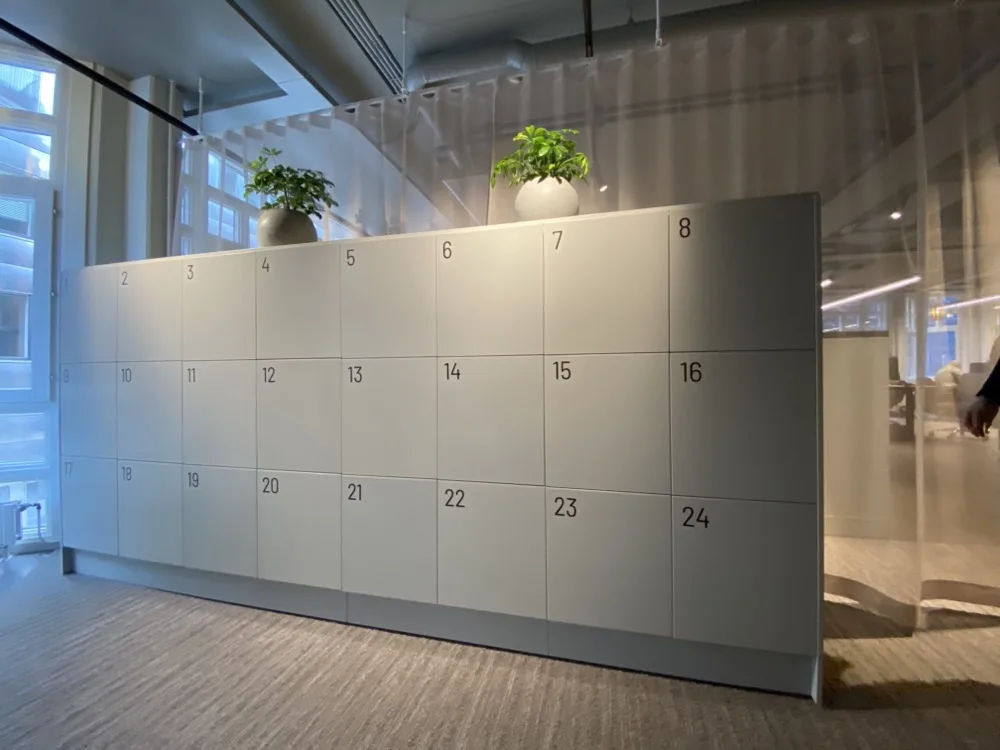
Self-serve, keyless, and mobile-powered. Awaio’s smart lockers eliminate office locker chaos, like lost keys, manual assignments, and IT headaches. Employees book and unlock lockers with their phones, while admins manage everything in one centralised dashboard.
Smart Lock for Modern Employee Lockers, Built for Hybrid Workplaces
Awaio Smart Lock turns lockers into shared digital storage units without complex IT setups, cabling, or mains power. Because it’s battery-powered and non-IoT, you can install the lock in new or existing office lockers.
There’s no cabling to run and no dependence on network gateways or unstable Wi-Fi, so you can set up lockers in a few minutes without technical expertise. Users keep 24/7 access even when the network goes down or IT systems are under maintenance.
Employees find, reserve, unlock, and share lockers by tapping a button in the app or scanning the QR code sticker on the locker, so they don’t have to worry about lost keys or forgotten codes. Admins see how it’s all working in an analytics dashboard:
- Reservations: every employee locker booking, in one view.
- Battery capacity: the current charge of each lock’s battery cell, so you can replace depleted cells before they run out.
- Occupancy rates: locker usage segmented by teams and individuals, so you can reduce, reassign, or relocate underused lockers.
Do Employers Have to Provide Lockers, and What Do Smart Lockers Cost?
Workplace health and safety rules in many countries require employers to give staff somewhere to store personal clothing and belongings, especially where people change into uniforms, protective equipment, or workwear on site. A standard desk-based office usually has no strict locker requirement, although hybrid offices without assigned desks often need lockers anyway. Rules vary by country and sector, so check your local workplace regulations.
What drives the cost of a smart locker system?
A smart locker budget covers far more than the locks. The main cost drivers are:
- Hardware: buying a new integrated locker bank costs far more than fitting smart locks to cabinets you already own.
- Installation and cabling: wired systems need electricians to run power to each locker bank, and some cabinets need modifying.
- IT and network gateways: many systems route every lock through Wi-Fi, Ethernet, or a gateway that your IT team has to install, secure, and maintain.
- Software subscription: pricing usually depends on the number of lockers, sites, and integrations such as single sign-on.
How many lockers you buy matters as much as the price of each one. CBRE’s global occupancy research found that average office utilisation reached 53% in 2025, while peak days averaged 80%. Sizing for the busiest day leaves many lockers empty the rest of the week, which is why usage data matters before you buy. Once Awaio customers can see their usage data, they often find they need only 60% to 70% of the lockers they originally installed.
How Awaio lowers the setup cost
Awaio’s battery-powered Bluetooth locks retrofit onto compatible existing lockers. Your cabinets stay in place, and because the phone talks directly to the lock, you don’t need to run cabling or install an IT gateway. That removes the biggest setup costs listed above, as the comparison table further down shows. Your budget still needs to cover the locks, fitting, the software subscription, and battery replacements every two to three years.
Where new cabinets make more sense, such as for parcel distribution and e-bike charging, Awaio also supplies complete lockers with pre-installed locks.
7 Key Features That Turn Traditional Lockers into Secure, Smarter Storage
1. Quick, Cable-Free Setup for Secure, Versatile Lockers
Retrofit our lock into existing and new cabinets in minutes—without running cables, taking measurements, or hiring a locksmith. And since it’s Bluetooth-enabled (non-IoT), the battery life lasts long and keeps working without constant upkeep.
Another major advantage of battery-powered locks is their flexibility. Unlike traditional electronic locks that need complex hardware and network setups, Awaio makes it easy to reorganise your office storage with no cables or installations required.
Because of this flexibility and Awaio’s keyless nature, lockers can be used for:
- Parcel Delivery – For secure delivery and collection of packages. Way better than turning receptionists into parcel handlers.
- Locker Rooms – For employees to store clothing, uniforms, or personal items during work hours.
- Employee Storage – For personal belongings, laptops, or items that need to be securely stored.
- Equipment Storage – For tools, devices, or equipment used within specific departments or teams.
- IT delivery cabinet – For employees to pick up and return IT equipment at their convenience.
- Visitor Management – To assign temporary lockers for visitors or contractors to store their belongings during their time in the office.
- E-bike battery charging – To provide a safe and secure way to store and charge e-bike batteries, minimise fire risks, and stay compliant with safety regulations.
Furthermore, Awaio can be a standalone locker solution with no IT integration required. Here are its key features:
2. Central Access Via Mobile and Web

Book lockers on your terms. Whether on the go via our mobile app or on our desktop app, you can find and reserve a locker for any duration—a single day, multiple days, a few hours, etc.
Employees use the app to find a free locker, book it, open it with their phone, and share access with colleagues. Admins work in the web dashboard, where they add and configure lockers, set booking rules, and review usage and opening history across every site.
3. Self-serve Locker Management
Employees can create team lockers and remotely grant colleagues access to retrieve time-sensitive documents, shared materials, and parcels—without facility managers’ intervention or physically meeting colleagues to exchange RFID cards.
4. Works With Microsoft 365, Google Workspace, and Outlook
Awaio Smart Lock integrates with Microsoft 365, which enables you to reserve a locker and log in to our app with your Microsoft account details. More secure than traditional passwords and PINs, as it relies on Microsoft’s enterprise-grade encryption.
Teams on Google Workspace can sign in with their Google credentials instead. With the Outlook Calendar integration, employees see their meetings in the Awaio app and can book a locker directly from a scheduled meeting. Google Calendar users can also sync their upcoming events.
5. Monitor Locker Usage in Real Time

How many lockers do we really need? Are they enough? What locker size is used most? Are the batteries depleted? Stop relying on hunches. With Awaio, you get real-time data on locker usage and battery capacity so that you can make smarter, more informed decisions. Besides this, you can:
- Manage all your lockers and batteries from a single, easy-to-use dashboard
- Routine security testing for protection
- Set custom booking rules to avoid lockers sitting unused
- With insights into opening data, you can avoid over-purchasing and make smarter buying decisions
- Get access to dynamic usage data and track how lockers are being used in real-time
Overall, with each locker typically occupying just 1m², you’ll not only cut costs but also optimise your space and reduce your office footprint, contributing to a more sustainable work environment.
6. Find Nearby Resources

Use Find Nearby to see unreserved lockers near you, then locate them on the interactive office map. See how Find Nearby works.
7. Easy Locker Allocation

Allocate and deallocate lockers to specific teams, individuals, departments, or even visitors. This way, you can restrict access to specific locker areas and strategically allocate lockers based on utilisation data.
Booking rules then control how each locker gets used. You can set:
- The minimum and maximum duration for all locker bookings
- How far in advance a locker can be reserved
- The number of times an individual can book a locker
- The number of lockers an individual can book daily
- A locker’s purpose, such as parcel delivery, employee storage, or visitors
- Whether an employee needs to confirm the booking, so unused reservations are released
… Also best suited for
- Corporations — Promote employee well-being and reduce desk clutter by providing secure storage for belongings and parcel deliveries.
- Shared Spaces (offices, coworking) — Attract more prospective members and differentiate your space from competitors.
- Commercial Real Estate (CRE) — Improve offering and increase the property’s rental value by offering smart storage solutions for tenants.
- Schools/Universities — Reduce the risk of theft and control access to specific resources.
How Do Smart Lockers Work?
Generally, smart lockers are secured by an electrical or battery-operated mechanism connected to the internet. To unlock them, users must first secure a reservation via a central terminal or software interface. Then, authenticate their identity using one of these methods:
| Access method | How it works | Pros | Cons |
|---|---|---|---|
| Digital access tokens | RFID tags or key cards | Employees can use cards they already carry | Can be lost, stolen, or cloned, and rely on internet connectivity, so they stop working when the internet is down |
| Biometric data | Thumbprints or facial scans | Enterprise-grade security | Expensive to install and maintain, and repairs cost even more |
| Memorised access codes | A PIN entered at the locker | More reliable than physical keys | Codes can be compromised through social engineering or brute-force attacks, and users share or forget them |
| Digital keys | A key sent to the user’s device, usually over Wi-Fi and NFC (Near-Field Communication) | Nothing physical to carry | Depend on Wi-Fi and NFC infrastructure |
Now, these authentication systems typically require employees to be physically present to reserve lockers from a central terminal. They also rely on hardware and a complex IT infrastructure, and the costs add up fast. This includes, but is not limited to:
- Buying and installing the hardware.
- Ongoing maintenance and support.
- Energy bills.
Conversely, Awaio’s smart lockers work without complex integrations and systems—be it cables or IT integrations. Users can locate, reserve, and unlock lockers via their smartphones, without physical keys, padlocks, or combination locks. Teams that already use staff cards can choose Awaio’s RFID-enabled locks instead.
This saves you money and lets employees reserve lockers in the Awaio app or through their Microsoft account. Here’s how it works:
Book On the Go — Always Have a Locker to Store Valuables.
Arriving at the office with your backpack and lunch, only to find every locker at the booking terminal already taken, is a frustrating way to start the day. Awaio’s remote booking prevents this by letting employees reserve lockers in advance for the days they’ll be in the office.
On a Sunday evening or Monday morning, while planning for the week, all employees need to do to reserve a locker is:
- Open the mobile app
- Tap “Storage” on the mobile app’s home screen
- Select a locker or cabinet, and
- Specify the duration—hours, days, etc.
Planning ahead doesn’t stop at lockers. With Awaio, employees can reserve parking spaces, desks, meeting rooms, and other bookable resources in advance.
Simplified Booking — Find Lockers Nearby
Ever experienced this?
- You sorted through a list of workplace lockers
- Found one ( 😀)
- But wait; It’s far away. Now, you either make the trek or start the search all over again ( ☹️).
This is a common headache, especially in large office complexes where locker clusters are far apart. And it leaves you feeling frustrated, wishing you could see which lockers are closest to you. Well, with Awaio’s Find Nearby feature, you can.
Using Bluetooth Technology, the feature finds and displays unreserved smart lockers within a 5 to 30-meter radius. From there, you can:
- Check out each locker’s specifications and image,
- Select one that suits your needs,
- Locate it using the interactive map and the number on its QR code sticker.
This simplifies the process of finding available lockers, freeing up time for employees to focus on productive tasks while giving them an enjoyable experience at the office.
Encourage Collaboration — Create Team Lockers and Share Access.
Awaio’s smart lockers allow employees to create team lockers and share their access with colleagues without the intervention of an administrator.
For example, let’s say employee A is on sick leave and a team member needs to retrieve a shared project laptop from their locker.
From home, Employee A will find the team member from their favourites tab and make them one of the locker’s owners. The team member will then be notified, receive the digital keys to the locker, and use the Interactive Map to locate it.
Automate Reservation Rules and Maximise Your Current Storage Capacity
Sometimes, employees may book lockers for extended periods just in case they need them and then don’t use them. This creates a false impression of high demand, making it seem like there aren’t enough lockers available.
So, to address this artificial shortage, you may buy more lockers only to find that they too remain largely unused, leading to waste.
Awaio’s real-time usage data, including opening and activity logs, shows which booked lockers are actually opened, so you can release idle ones before buying more.

1️⃣ Reserve a locker – Employees can book through an app, QR code, or calendar.
2️⃣ Unlock with a smartphone – No physical keys, just digital access.
3️⃣ Share or reassign lockers – Grant access to teammates or departments.
4️⃣ Monitor locker usage – Get real-time insights via cloud software.
What are the Different Types of Smart Lockers?
Smart lockers are broadly divided into three categories based on their working mechanism:
- Biometric Smart lockers use fingerprints, facial features, iris patterns, and voice recognition. They provide high-level security but require specialised hardware and IT setups that dig a hole in your pocket.
- Electronic Smart lockers work with electric power. They operate with RFID chips, keycards, and tags. Although cheaper than biometric locks, they still cost a lot to install and maintain. RFID keycards are also easy to lose, which can pose security risks.
- Smartphone-enabled smart lockers can be reserved and unlocked using a smartphone. They are either battery-powered (which needs no cabling or network infrastructure), like Awaio, or IoT-enabled (which requires expensive hardware).
Each type of smart locker above trades convenience for cost and complexity.
For example, biometric smart lockers let you reserve lockers using your biometrics but are complex and costly to set up and maintain. The same goes for electronic and IoT-enabled smart lockers.
However, Awaio breaks the mould by offering a smart locker system that’s:
- Convenient—Employees can find, reserve, and unlock lockers via the mobile app.
- Cost-efficient—Because it works without complex IT infrastructure and is non-IoT, Awaio eliminates the cost of installing, maintaining, and repairing IT infrastructure systems.
- Easy to install—Awaio’s Bluetooth-enabled smart lock can be installed on new and existing lockers within minutes.
Looking for a solution that combines all the features you need? Book a demo.
Here’s an overview of how Awaio compares to other smart locker solutions for hybrid offices:
| Feature | Awaio | Vecos | Smartalock | eLocker |
|---|---|---|---|---|
| Battery-powered (no cabling) | Yes | Yes (Wired or wireless options) | No | Yes (Wired or wireless battery options) |
| Retrofitted into existing lockers | Yes | Yes | Yes | Yes |
| Locker reservation via the mobile app | Yes | Yes | Yes | No (built for collection and handover workflows) |
| IT setups and network gateways | No | Yes | Yes | Yes |
| Unlock via mobile app | Yes (uses Bluetooth technology) | Yes | Yes (uses Bluetooth technology) | Yes (eLocker app or access card) |
| Cloud software and real-time analytics | Yes | Yes | Yes | Yes |
| Interactive map | Yes (easily find and book a locker directly on the map) | No | Yes | No |
| Microsoft 365 integration | Yes | Yes | No | No |
Last verified: October 2026, based on each vendor’s public product information.
Are Smart Lockers Safe?
Yes. Smart lockers are more secure than conventional keyed locks, and the answers below cover the questions facility managers ask most often.
Can smart locker access be copied or shared without permission?
No. Unlike physical keys, smart locks can’t be duplicated, and you keep complete control over who can access each locker at any time.
Can admins see who opened a locker and when?
Yes. Smart locks record who uses a locker or any keyed resource. This creates an audit trail you can use to investigate security breaches. In Awaio, opening history sits alongside bookings in the admin dashboard.
What happens if an employee loses their phone?
Admins can revoke the lost phone’s access instantly from the Awaio admin panel. In the meantime, the employee can unlock their locker using a colleague’s phone, or an admin can open it for them. Because there are no physical keys to replace, a lost phone causes minimal disruption.
Awaio smart employee lockers benefit from the security measures above and add an extra layer of security by offering SSO functionality. As such, employees can log in with their Microsoft account details, which activates Multi-Factor Authentication (MFA).
- Instead of remembering multiple passwords, employees can simply log in with their regular work accounts. This eliminates security vulnerabilities caused by weak, reused, or easily guessed passwords.
- The extra check MFA provides makes it harder for hackers to access the locker system.
- SSO reduces the attack surfaces hackers can target to compromise the system.
What Facility Managers Are Saying
“Awaio transformed how Mölnlycke Healthcare manages storage and access, ensuring flexibility while making adoption effortless for employees.”
Anders Rydblom, FM Director, Mölnlycke Healthcare

Tired of Locker Chaos? Let’s Fix It Together.
Say goodbye to lost keys, manual assignments, and IT headaches. See how Awaio’s smart locker system can transform your office storage in minutes.


