


Do you have multiple conference rooms and smaller meeting rooms? For many businesses, managing meeting rooms and spaces can be a puzzle—with double bookings, wasted rooms, and manual scheduling errors being surprisingly common.
There’s also the bigger challenge of tool fragmentation.
One platform for meeting rooms, another for desks, a third for visitor check-ins, a fourth for parking. None of them talks to each other, so the facility manager ends up doing manual work to patch the gaps. That’s exactly the kind of overhead software is supposed to eliminate.
Meeting room booking tools are designed to fix the challenge of managing meeting rooms: think of improved productivity, optimized space usage, and fewer empty rooms or scheduling conflicts. But if you manage more than just rooms — desks, lockers, parking, visitors — you need a system that handles all of it. Otherwise, the admin overhead remains, and so do the costs of maintaining multiple tools.
To make your search easier, we’ve reviewed the best meeting room booking software tools in 2026, one of which manages all workplace resources. We cover their standout features, honest pros and cons, pricing, and who each tool is actually built for.
Here’s a brief overview of what we cover later:
| Solution | Best For | Pricing |
|---|---|---|
| Awaio | Hardware-free, all-in-one workplace management | From €10.9/room/month |
| Skedda | Hybrid offices with tiered access. | From $99/month |
| Robin | Enterprise hybrid work coordination | Custom (contact sales) |
| Envoy | Enterprise-level visitor management with basic room booking capabilities. | $4,344 per location/year |
| OfficeSpace | Enterprise space planning & move management | Custom (contact sales) |
| Archie | Best for hybrid offices that need to monetize space | From $8 per room/month |
| Joan | Hardware-heavy meeting room management in enterprises | From $99/month + hardware |
| YAROOMS | Organizations with Microsoft Teams-native booking | From $99/month (10 users) |
| Tactic | Simple hybrid meeting room management | From ~$3/workspace/month |
| Deskbird | Best for Meeting Room and Schedule Management | Starts at $3.75 per active user per month |
| Accruent EMS | Enterprise & campus scheduling | From $110/user/month |
| Officely | Slack-first teams | From ~$2.50/user/month |
What Makes a Great Meeting Room Booking Software?
There are multiple room booking tools on the market, and most look similar. To cut through that, we combined our own experience, conversations with users, and independent reviews from G2 and Capterra to narrow the list down to the tools that actually deliver on these fundamentals:
- Real-time availability. The system must show exactly what’s free right now, not what was free ten minutes ago. Stale data leads to double bookings, which frustrate employees.
- Ghost meeting prevention. A room booking tool without a check-in requirement is barely better than a shared spreadsheet. The best systems automatically release rooms when nobody shows up, so the space gets used rather than sits empty and blocked.
- Calendar integration. If bookings don’t sync bidirectionally with Microsoft 365 or Google Calendar, employees won’t trust the system. They’ll fall back to email.
- Booking rules and admin controls. Admins need to limit how far in advance rooms can be booked, cap reservations per person, and restrict access by team or department.
- Analytics. Space utilization data helps justify real estate decisions. Which rooms are consistently overbooked? Which sit empty? Which times see the most demand?
- Ease of adoption. The best room booking software is the one your team actually uses. If booking feels slow or complicated, people avoid it — and the ghost booking problem never gets solved.
Beyond the basics, it’s worth asking how much of your wider office management challenge a given tool addresses. Room booking alone is a starting point. Managing desks, lockers, parking, and visitors from the same platform is a different value proposition and is more useful for most facility managers.
How We Evaluated Different Room Booking Solutions (Methodology)
Every product in this guide was evaluated using the same criteria.
We reviewed each vendor’s official website for verified features, pricing, and positioning. We then cross-referenced that with independent user feedback from G2, Capterra, and Gartner Peer Insights, focusing on reviews from 2024 to 2026.
We scored each platform across five areas: ease of use, meeting room booking features, pricing and value, breadth of workplace management coverage, and integration quality.
1. Awaio — Best for Hardware-Free, All-in-One Workplace Management

We’re kicking this list off with Awaio, a mobile-friendly meeting room booking software. What makes Awaio stand out is its hardware-free approach, which extends beyond meeting rooms to other office resources—parking spaces, lockers, cabinets, desks, and even EV charging pools. This means you don’t need any expensive displays or hardware setups.
Unlike legacy systems that only support static meeting rooms, Awaio’s QR-based solution lets you turn any meeting space and shareable asset into a bookable resource—whether it’s a traditional meeting room, a focus pod, lockers, a phone booth, or even a podcast studio. If it can be shared, it can be added to the Awaio platform.
As a result:
- You don’t have to worry about costly maintenance for digital displays, cabling, or installation.
- Your colleagues can easily see real-time availability in meeting spaces and conference rooms on their phones or desktops—no more meeting interruptions or scheduling conflicts.
- You can set custom booking rules around durations, pre-set time slots, automatic confirmations, and more, making sure meeting rooms are being effectively used.
In short, with Awaio, everyone at the office will have essential real-time meeting room availability at their fingertips. You can also use the Branded Admin Portal to access real-time data and reports on space usage—to improve your office layout and lower real estate costs.
The simple-to-use platform allows you and your team to not only manage meeting and conference room bookings, but also:
- Find and book desks
- Book, access, and open assigned lockers
- Find, book, and manage parking spaces
- Tailor access to various office resources by department and team
All within the same interface.

Here are 5 practical ways in which our customers take advantage of Awaio’s feature set:
1. Instantly find and book the best room (and any other resource you need)
Although many meeting rooms are booked days in advance, last-minute bookings are pretty common. Whether it’s a brainstorming session or an urgent matter that needs a few team members to lock heads in a meeting room, you need a system that perfectly mirrors the office with availability in real-time.
See for yourself how easy it is to find and book a room with Awaio
With Awaio, you can book a meeting, conference room, and any other resource you might need for each workday in 3 simple steps, with just your mobile phone or desktop device:
- Simply open Awaio on your phone or desktop; it’s automatically synced with your Outlook or Google Workspace calendar. You can also assign a room to any existing or new meeting right from your calendar.
- Once you’re in, you’ll get a real-time overview of available rooms and their time slots.
- Drag to select a time, add attendees to the invite, and click ‘Book’ to confirm. You can also tag meeting rooms with different labels for easy organization.
Optional physical QR signs (€39 each, aluminum, no wiring required) are also available as an add-on, but not a requirement. The booking infrastructure is entirely software-based. When the QR code sign is placed on a resource, employees can quickly scan the code outside the meeting room to grab a room on the go.
2. Prevent ghost bookings with custom booking rules, live availability dashboards, and automated reminders
Ghost bookings are one of the most frustrating parts of managing office space. A room is reserved, nobody shows up, and now it’s blocked for an hour while your team stands in the hallway looking for somewhere to meet. The same problem follows you to desks, parking spaces, and lockers, essentially all shareable resources.
Awaio’s admin panel lets you set booking rules to prevent scheduling issues:
- Booking duration: Set minimum and maximum times for room reservations.
- Booking confirmation: Define timeframes for employees to confirm bookings before they are released.
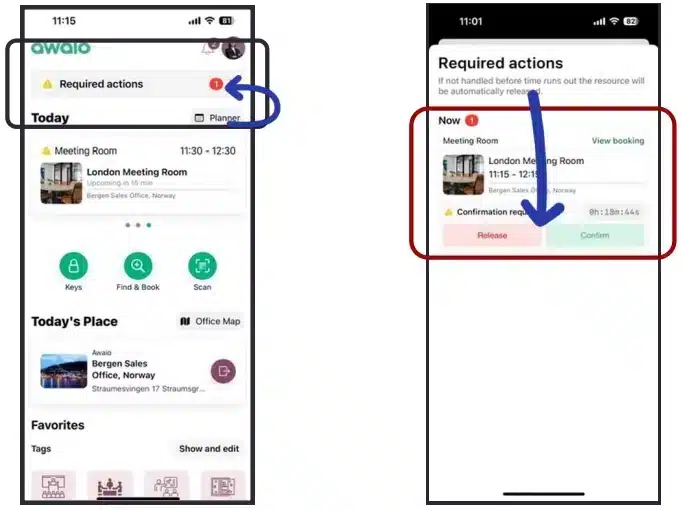
- Notifications and reminders: Enable automated alerts to keep users informed through push notifications, email, Slack, or Microsoft Teams.
- Pre-defined time slots: Create options like half-day or full-day bookings and control how far in advance users can reserve a space.
Every office has its own way of operating, and this customization lets you set booking rules that fit your specific needs, keeping everything organized and aligned with your office policies.
3. Easily sync with your Microsoft or Google Calendars
One of the most important aspects of meeting room booking software is its capability to integrate with Google Calendar, Outlook, and so on. You want a system that, as soon as a meeting is booked or updated on one platform, automatically reflects on the other—including attendee lists and room availability. If not, you’ll likely run into scheduling conflicts and double-bookings.
With Awaio, you can:
- Integrate with Microsoft 365, Microsoft Room Booking, Microsoft Teams Meetings, Google Workspace, and Google Room Booking—with one click.
This means that no matter where you create an event—Awaio, Outlook, or Google Calendar—attendee lists are automatically synced, timeframes are precisely set, and Microsoft Teams or Google Meet links are added instantly.

4. Understand how your rooms are being used
Nobody wants to pay for an expensive office that doesn’t serve its primary purpose: being used to the fullest. Understanding which rooms and resources are in high demand—and which ones aren’t—helps you make the most of your space.
Here’s how Awaio helps you optimize your space with workplace data:
- Track room reservation trends: See which rooms are reserved the most with reports that show booking trends over time, so you can adjust your space plan accordingly. Repurpose unused rooms into spaces that better support your team’s needs.
- Review room bookings: View past, current, and future conference and meeting room reservations to understand usage by employee, team, attendee count, and more.
- Plan for future capacity: Forecast meeting room needs by looking at the most booked room types, and average room capacity.
- Track office usage: Identify the busiest times for room bookings and understand trends in how employees book and use spaces, such as booking habits and preferences for in-person versus remote meetings.
In a nutshell, Awaio shows you which resources are being used, which aren’t, and most importantly, why.
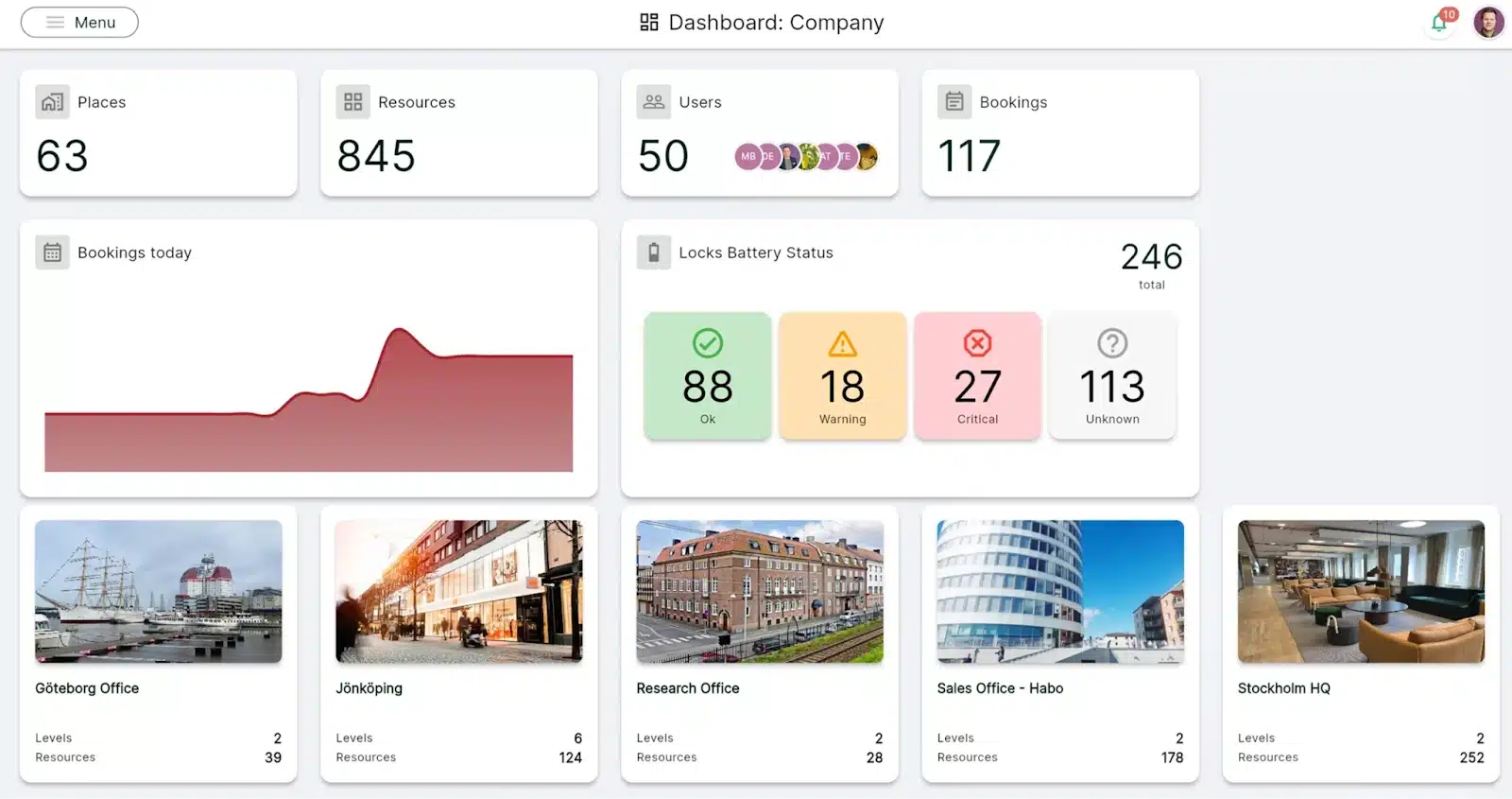
This data can be pulled into custom reports to help inform decisions on space allocation, scheduling rules, and overall resource management.
5. Easy to set up, user-friendly, and built for quick user adoption
One of the biggest complaints users have with traditional meeting room booking systems is their clunky interface, making it difficult to reserve space. The process of finding and booking an available room is often lengthy and confusing.
As a result, this may have a domino effect on the productivity of your team, who will be using the system daily.
Since Awaio doesn’t require complex installation of cables, displays, and IT infrastructure, the implementation process is straightforward and quick. Here’s what it enables for you:
- Save significant upfront costs on physical displays and desk sensors
- Add rooms, desks, or other resources without extra cabling, setup costs, or maintenance
- Get rid of ongoing maintenance costs
- Skip the lengthy implementation time and hardware setups
Plus, getting started with Awaio just takes three straightforward steps:
- Create your workplace community right in the app.
- Add your spaces—whether it’s meeting rooms, conference rooms, parking spots, or desks.
- Invite your team and start booking.
Discover how Awaio’s hardware-free approach can transform your workspace. Book a demo today.
Furthermore, a good meeting room booking system should be simple and easy to use, and Awaio delivers just that. The easier it is for your team to book a room, the more likely they are to use the system. With Awaio, finding and booking a meeting room takes no more than three clicks or taps.
You can also set custom tags to each room based on room type (conference room, breakout room, video conference room, etc.), capacity, available equipment, and more. That way, you can quickly filter and find meeting spaces based on what you need.
Once you’ve found your preferred meeting rooms, just mark them as ‘favorites’ and they’ll always be ready for you on your dashboard.
The office map provides a live, interactive overview of the entire office—making it easy for you to spot the nearest and most suitable meeting rooms.
Experience Awaio’s user-friendly platform for yourself. Schedule a demo and see why it’s a top choice for the modern office.
Pros
- Awaio manages more than just rooms. Science Park Jönköping uses the Awaio platform to manage shared meeting rooms, desks, and digital keys for lockers and storage for 500+ people across 100+ companies.
- The learning curve is basically flat. Employees with or without technical experience can navigate the platform easily.

- No hardware means no maintenance and admin headaches. Norwegian Property Group cut administration by 95% after switching, and space utilization actually went up, not down.
- It delivers full value, without forcing you to spend on extra hardware accessories or maintenance. This allows you to cut down on unnecessary costs.

- Awaio charges per room pricing, not per user, making it a valuable option for companies with larger or variable headcounts.
Cons
- Visitor management is currently unavailable but is set to launch in 2026
Pricing
| Plan | Price | What’s Included |
|---|---|---|
| Room booking | €10.9/room/month | Unlimited users, all room types, Microsoft 365 & Google Workspace integration |
| Office map | €190 one-time | Digital office map, wayfinding, setup from PDF or DWG file |
| QR signs (optional) | €39 per sign | Physical aluminum QR sign, no cabling required |
Verdict
Awaio is the strongest option for organizations that want to eliminate hardware infrastructure while managing more than just meeting rooms. If your office needs desk booking, locker management, parking, and room booking from a single system — and you want to avoid the cost and complexity of physical displays — Awaio is built for exactly that scenario. The per-room pricing model also makes it significantly more predictable to budget than per-user alternatives as headcount grows.
2. Skedda — Best for Managing Tiered Access in Hybrid Offices

Skedda is a space scheduling platform used by 12,000+ organizations, including IBM, Siemens, Mercedes-Benz, and Harvard University. It’s been rated #1 for Space Management on G2 for three consecutive years, and its support team is consistently flagged as one of the best.
Where Skedda pulls ahead is its rules engine. Most platforms let you set basic booking windows and call it a day.
Skedda lets you define who can book what, how far in advance, how often, and under what conditions, without needing to upgrade to an enterprise plan to access any of it.
This makes a real difference when your office isn’t one-size-fits-all.
Say your leadership team needs priority access to the boardroom, your engineering team books focus rooms in two-hour blocks, and external contractors can only reserve spaces during certain hours.
In most tools, enforcing that requires manual admin work or workarounds. In Skedda, you set the rules once, and the system handles them automatically.
A major limitation is its per-space pricing. This means you should expect to pay more for each extra space you need to manage. And since there are space limits on each tier, you might be forced to upgrade at a certain point.
Skedda Standout Features
- Interactive floor plans
- Advanced booking rules engine: quotas, buffers, approval workflows, granular access controls
- Two-way sync with Microsoft 365 and Google Calendar
- Ghost meeting prevention via QR code scan, email confirmation link, or passive Wi-Fi detection
- Microsoft Teams and Slack integrations
- Per-space pricing (not per user)
Pricing
Skedda offers three pricing tiers based on the number of resources (rooms, spaces) you need to manage:
- Starter: $99/month for up to 15 resources
- Plus: $149/month for up to 20 resources
- Premium: $199/month for up to 25 resources
Note: Each resource represents a bookable space (meeting room, desk, etc.) in your organization.
Pros
- Users find the onboarding very smooth and easy. New users get a personalized setup experience — including custom how-to videos for their specific space — and ongoing learning resources.

- The advanced booking rules help facility managers grant tiered access to employees without disrupting the office experience.

- Before signing up, you can try out the free trial. You can also request that Skedda’s team build interactive floor plans from your actual office layout at no extra cost.
Cons
- Visitor management is a paid add-on that costs approximately $99/month.

- Costs increase as you add spaces — every bookable item counts toward plan limits
- Several useful features (visitor management, assigned desks, and custom branding) sit in higher tiers. For example, while it offers customizable booking rules, the starter plan limits you to just one booking condition.
Verdict
Skedda is the right pick if rule depth is your top priority. It’s particularly well-suited to organizations with a large office and multiple limited-access areas. The rules engine is among the most configurable on the market. However, your subscription fees are bound to increase dramatically as you scale, due to space limits on each tier.
Need to manage more resources without hitting limits? Discover more cost-effective Skedda alternatives.
3. Robin — Best for Enterprise Hybrid Work Coordination

Robin is primarily used by large organizations running complex hybrid environments. It covers the basics well: desk booking, room scheduling, and visitor management.
But the reason bigger organizations tend to choose it over simpler tools is the data layer.
With over 100 KPIs and AI-powered room suggestions based on meeting size and attendee preferences, the platform helps organizations manage their resources efficiently. If you’re managing dozens of rooms across multiple floors and need to justify every square meter to your real estate team, that level of visibility matters.
However, to view availability, resources, and capacity, you need to purchase the room display panels, which are an optional add-on and not included out of the box.
This means you’re opting into extra hardware and extra cost on top of an already premium price point.
Robin Standout Features
- AI-powered room suggestions based on meeting size, attendees, and preferences
- Interactive office maps with real-time colleague visibility
- 100+ KPIs and space analytics to support real estate decision-making
- Visitor management module
- Sensor integration for real occupancy detection (not software-estimated)
- Room display panel support
- Integrates with Outlook, Google, Slack, Teams, Webex, and more
Pricing
Robin’s pricing is quote-based. You can contact the sales team for a quotation.
Pros
- The interface is genuinely easy to pick up. Booking a desk or room takes seconds, and the floor plan view makes it immediately clear where your team is sitting and what’s available.

Cons
- Availability doesn’t always refresh instantly during peak hours. This can lead to scheduling conflicts.

- Some users find it hard to book rooms via the app because it’s hard to see which rooms are available in the calendar view.

- If you want live availability shown outside each room, you need to purchase display panels that add extra costs on top of an already premium price point.
Verdict
Robin is a great fit for large enterprises with multiple locations, complex hybrid policies, and a genuine need for deep space analytics. For mid-sized teams, the cost and configuration complexity are difficult to justify when simpler tools cover the same core requirements.
4. Envoy — Best for Visitor Management + Room Booking

Envoy started as a visitor sign-in tool and has since expanded into a full workplace platform. But over the years, it’s added desk booking, room scheduling, delivery management, and occupancy analytics, making it a genuine all-in-one option for offices that need to manage both people and spaces.
However, visitor management remains Envoy’s strongest feature, allowing organizations to grant visitors tiered access and track where exactly they are.
In addition to that, Envoy offers a virtual receptionist service that handles guest check-ins without a staff member present — useful for offices with high visitor traffic but limited front-desk coverage. Visitors can sign in, complete any required documentation like NDAs, and receive their access credentials, all without human involvement.
The catch is that Envoy’s roots show in how it’s priced.
Each module — visitors, rooms, desks, advanced analytics — is sold separately. For offices where visitor management is a core requirement alongside room booking, that breadth is worth it. For offices that mainly need room scheduling, you’re paying a premium for a feature you’ll barely use.
Check out some Envoy alternatives that charge you less for the same features.
Envoy Standout Features
- Industry-leading visitor management: pre-registration, customizable check-in flows, badge printing, watchlist screening
- Room and desk booking with auto-release for no-shows
- Delivery management (mailroom handling)
- Emergency notifications and alerts
- Occupancy insights and analytics
- 60+ integrations, including access control, WiFi, Outlook, and Teams
Pricing
Envoy’s desk and room booking software starts at $4,344 per location/year. Pricing is determined by the number of user licenses. A freemium plan is available.
Pros
- Envoy continues to improve the platform to cover a variety of shared resources in office buildings.

The real-time availability dashboard makes it easy to get a real-time picture of who’s in the office and who’s remote.

- Its integration with Openpath access control systems delivers accurate data on who is actually in the office at any given time.

Cons
- Users must be on the most expensive plan to enjoy some core workplace management features.

- Some admin tasks take extra steps that waste time. For example, updating a user’s name or moving someone’s desk assignment requires more steps than it should.

- Envoy’s modular pricing means you’re paying separately for visitor management, desk booking, room booking, and advanced features like access control and automated reports. This raises subscription costs when you add the resources you need.
- It’s built around visitor management first; desk and room booking are secondary products. So, if visitor management isn’t a core requirement for your office, you’re paying a premium for a capability you don’t really need.
Verdict
Envoy is worth considering when visitor management is a central requirement alongside room booking. For offices where room scheduling is the primary need, and visitors are secondary, the cost is difficult to justify against purpose-built alternatives.
5. OfficeSpace — Best for Enterprise Space Planning & Move Management
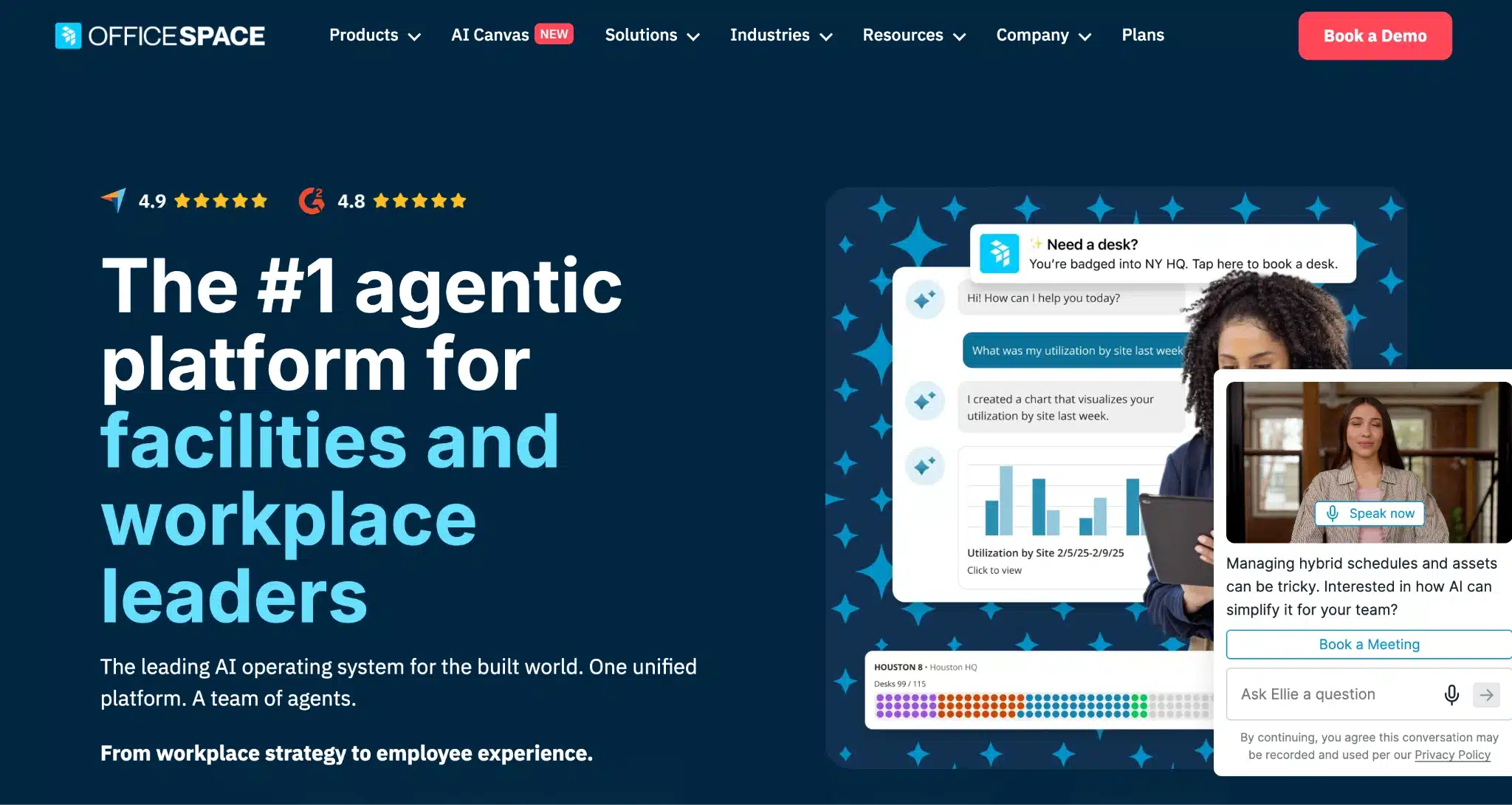
OfficeSpace goes well beyond room booking. It’s built for large, complex organizations that regularly reorganize teams, manage frequent office moves, and need to connect space planning with real estate strategy.
That’s because it’s one of the few platforms that handles move management and asset tracking alongside booking — in one system.
Where it really earns its place is in handling move management and asset tracking alongside booking. If you’re managing hundreds of desks across multiple floors and running frequent team reorgs, the platform is great for you.
OfficeSpace lets you run scenario comparisons, plan moves, and generate occupancy reports without outsourcing the work or waiting weeks for data. Instead of guessing how a reorg will affect your space, you can model it first — test how shifting a department changes room demand, whether consolidating two floors frees up capacity, or how a new hybrid policy affects peak-day occupancy before you commit to anything.
The platform also has a built-in AI layer that automates planning cycles, flags underused spaces, and keeps floor plan data up to date. That way, you’re not manually updating a spreadsheet every time someone moves desks.
The trade-off is complexity and cost.
OfficeSpace’s wayfinding feature requires sensors attached to resources to work, which means an upfront hardware investment and ongoing maintenance on top of an already premium price point.
OfficeSpace Standout Features
- Desk booking, room booking, visitor management, wayfinding, asset tracking, and maintenance workflow management
- Drag-and-drop floor plan editor with AI-powered space optimization recommendations
- Strong scenario planning tools for office reconfiguration
- Facility request management and workplace announcements
- Integrates with Microsoft, Google, Slack, and Zoom
- Analytics and occupancy insights for real estate decisions
Pricing
They have two main plans: Essentials Plus and Pro Plus. However, you must contact the sales team for a quote.
Pros
- Admins can generate occupancy reports and identify office trends without friction. This way, you can optimize space usage.

- You can easily manage multiple sites simultaneously on the platform.

- Its scenario-planning functionality makes it easy to manage large-scale moves, without disrupting the office space.

Cons
Customers mainly complain that it’s difficult to change user information and edit other key layout information.

- Wayfinding only works with sensors attached to resources. This adds upfront hardware and ongoing maintenance costs.
- Some valuable features are limited to higher plans only. This increases subscription fees for organizations that need its full capability.
Verdict
OfficeSpace is built for large organizations managing frequent moves, complex floor plans, and multiple buildings. For mid-sized offices with simpler needs, the complexity and cost are hard to justify.
6. Archie — Best for Hybrid Offices That Need to Monetize Space

Archie is a meeting room management platform with extra features for desk booking, room scheduling, and visitor management.
This makes it the perfect fit for both offices and shared workspaces, and for those running a workspace where some rooms are internal, and others are available for external booking.
To manage external bookings, Archie automates the entire payment cycle: monthly invoices are generated, payments are applied, receipts are sent, and everything syncs with your accounting software automatically. You can assign booking credits per membership plan, set minimum cancellation windows to prevent last-minute changes, and let members manage their own plans without involving your team.
For organizations leasing out space to external companies or managing multiple membership tiers, this removes a significant amount of manual admin work.
The catch is the pricing model. Archie charges per space, and every desk, room, and bookable resource counts toward your plan limit. As your office grows or you add more resources, you’ll hit those limits faster than expected and be forced to move to a higher tier to unlock more capacity.
Archie Standout Features
- Room booking, desk booking, visitor management, and coworking management in one platform
- Visual floor plans with real-time availability and colleague finder
- QR check-in with automatic room release for no-shows
- Native integrations: Slack, Teams, Outlook, Google Calendar, Kisi, Brivo, Salto (access control), QuickBooks, Xero, and WiFi systems (Cisco, Ubiquiti, Aruba)
- Open API for custom integrations
- White-label mobile app option
Pricing
-
- Starter: $8 per room/month (Minimum is $159/month)
- Pro: $12 per room/month (Minimum is $249/month)
- Enterprise: Custom pricing
Pros
- The platform’s Calendar integration is reliable. Resource bookings in Outlook sync in real time.

- It empowers members of coworking spaces and employees to handle tasks such as booking and releasing resources themselves. This takes some work off the shoulders of admins.

- Employees can see who’s in the office and when. That makes it easy to plan in-office days around the people they actually need to meet with.

Cons
- The initial setup takes time, as it takes a while to configure the entire platform to work optimally. This delays the time to value.

- Every desk, room, and bookable resource counts toward your plan limit. As your office grows, you’ll hit those limits faster than expected — and moving to a higher tier is the only way to unlock more capacity.
Verdict
Archie is the strongest all-around choice for mid-sized offices, property managers, innovation hubs, and science parks that share resources across multiple companies or tenants.
7. Joan — Best for Hardware-Led Room Displays

Joan is the second platform on this list, after Robin, to lead with hardware. However, unlike Robin, Joan has battery-powered e-paper (e-ink) room display panels that are wireless, require no power cables, but still look great.
The battery-powered e-paper displays mounted outside each room are wireless, require no cabling, and stay powered for weeks between charges. They show real-time room availability at a glance, and anyone walking past can tap the screen to book, extend, or release a room on the spot — no app, no login, no extra steps.
For hybrid offices where the physical experience matters as much as the software behind it, Joan is a great fit. Plus, the e-paper displays make it easy to move from one room to another.
The software holds its own, too. It includes calendar sync with Google and Microsoft, room analytics, desk booking, visitor management, digital signage, and asset management.
The trade-off is connectivity.
Joan’s e-ink devices run on 2.4GHz wireless, which is a problem if your office uses 5GHz bandwidth — increasingly common in modern workplaces. If your network doesn’t support 2.4GHz, the displays won’t connect, and you lose real-time resource availability updates.
Even when connectivity isn’t an issue, the touchscreens themselves can be slow. Users mentioned noticeable lag, especially when loading floor plans, which turns a quick room check into a frustrating wait.
Check out some Joan alternatives with greater internet connectivity.
Joan Standout Features
- E-paper room display panels — wireless, battery-powered, no cabling required
- Software platform covering room booking, desk booking, visitor management, digital signage, and asset management
- Integrates with Microsoft 365, Google Workspace, Slack, and Teams
- Real-time room availability on panel display
Pricing
Plans start at €49 per month. There’s also a free plan available. However, E-paper hardware panels are purchased separately as an upfront investment.
Pros
- Unlike tablet-based solutions that need constant power and therefore cabling outside every room, Joan’s e-ink displays run on a battery alone.
- The batteries are long-lasting. Users get to charge them only once a month.

- It’s easy to mount and detach the displays, which is especially valuable when rearranging spaces or moving offices.

Cons
- It only works on 2.4GHz WiFi. Users on modern 5GHz networks have to reconfigure their entire network setup.

- The screens occasionally lag and take a while to return to normal operation. This disrupts the user experience.

- Joan’s displays can go dark without any advance notice — leaving a blank screen outside a meeting room until someone notices and charges it.

Verdict
The e-ink hardware requires no cabling and charges infrequently, which makes it easy to install, move, and maintain. This makes it a practical choice for offices that want displays outside every room without the infrastructure overhead that usually comes with them.
However, you should be prepared to reconfigure your network infrastructure to work with the 2GHz displays.
8. YAROOMS — Best for Microsoft Teams-Native Booking

YAROOMS is a meeting platform that makes it easier to manage bookings and coordinate schedules. Its Team Calendar shows who’s in the office, who’s working remotely, and who’s on leave — all in one view, updated in real time.
We included Yarooms on this list specifically because of its two-way integration with the Microsoft ecosystem.
When a room or desk is booked in YAROOMS, it updates automatically across Microsoft 365, Google Workspace, and Zoom simultaneously.
For hybrid meetings in particular, the booking details and video link appear in both YAROOMS and the user’s calendar straight away. Employees can also book directly from the tools they already use, without switching to a separate app.
The YARVIS AI assistant takes that a step further. Instead of manually filtering for availability, employees describe what they need in plain language in Microsoft Teams, and YARVIS finds and books it.
The trade-off is the pricing structure.
YAROOMS charges per user, and each plan comes with a fixed space limit. If you hit that limit, you move to the next tier regardless of whether you actually need the additional features that come with it.
For larger teams with variable attendance, that can mean paying for capacity you don’t fully use.
YAROOMS Standout Features
- Room booking, desk booking, parking, visitor management, digital signage, hybrid work calendar, analytics, and CO2 tracking
- YARVIS AI assistant books rooms in Microsoft Teams or Slack using plain language
- Interactive floor plans with live availability
- Emergency role coverage feature
- Room display panel support (compatible with iPad, Android, Kindle Fire)
- Integrates with Outlook, Teams, Google Calendar, Zoom, and SSO providers
- Analytics and reporting
Pricing
Per-user pricing model:
- Starter: $99/month (10 users and 1 location)
- Business: $399/month (50 users and 2 locations)
- Enterprise: $899/month (300 users and up to 5 locations)
Free trial available. Annual billing discounts apply.
Pros
- It reduces overhead by allowing employees to self-manage resources.

- All rooms uploaded to the platform include photos. That way, employees can visualize the space before committing to it.

- Bookings automatically sync with Outlook, preventing scheduling conflicts
Cons
- Viewing the floor plan or timeline on an iPhone is difficult.

Space limits force growing teams to pay for the next tier just to unlock capacity, not features.

Verdict
YAROOMS is the top pick for Microsoft-first organizations where Teams is the daily operating environment. The native Teams integration and YARVIS AI assistant make booking frictionless. Just watch out for per-user pricing that can escalate costs.
9. Tactic — Best for Simple Hybrid Team Management

Tactic covers the essentials: desk booking, room reservations, visitor management, parking, and office analytics. At $3 per workspace per month, it’s one of the most affordable options on this list. And for smaller teams using a room booking tool for the first time, that low entry point makes it easy to get started without overcommitting.
You pay for what you need, even across multiple locations, and still get useful features like bulk editing multiple spaces at once and tracking usage through graphs and charts.
The limitation shows up as you grow.
When your office layout changes, you can’t update the floor plan yourself; you have to send the new map to Tactic’s support team and wait for them to upload it. For a team that reorganizes frequently, that dependency adds friction at exactly the moment you need things to move quickly.
Tactic Standout Features
- Desk booking, meeting room reservation, visitor management, and parking management
- Interactive office maps with real-time availability
- Tessa AI assistant for admins
- Data analytics
- Integrates with Google Workspace, Microsoft 365, Slack, and Zoom
- Two-way calendar sync
- 200+ integrations
Pricing
Per-workspace pricing:
- Core: ~$3/workspace/month (desk and room booking, analytics, mobile access)
- Pro: ~$4/workspace/month (adds visitor management, SSO/directory sync, Tessa AI, advanced rules)
- Enterprise: Custom
Pros
- Compared to some other workplace management platforms, Tactic’s interface is easy to use. This allows employees to use it without any prior training.

Cons
- Every time a desk moves or a room gets reconfigured, users must send the updated map to Tactic’s team and wait for the changes to be made.

Although the platform is easy to use, a recent UI update added unnecessary steps. For example, selecting a desk or room now triggers a floor plan zoom, which feels like an extra click that slows users down.

- You might encounter some issues during the initial setup due to the complexity of the process.
Verdict
Tactic works best for small to mid-sized hybrid teams that want a straightforward platform with fast adoption and good support. It’s a practical option for organizations that find larger platforms overly complex, without giving up analytics or admin controls.
10. Deskbird — Best for Meeting Room and Schedule Management

Deskbird is a workplace management platform that extends to desks, office equipment, and, of course, rooms. It also has capabilities that help workplace managers organize schedules and ensure the office runs smoothly, as people book meeting rooms.
One of such capabilities is the hybrid work policy engine.
With it, managers can set specific in-office schedules by teams and determine which days are mandatory. For example, you can program the marketing team to be in three days a week, your finance team once, and the design team twice. You decide which days are mandatory, which are flexible, and who needs to approve any changes.
Deskbird then enforces those expectations without anyone having to chase people manually.
As employees plan their week, they can see how many in-office days they still need to hit. Managers get a live view of who’s in, who’s remote, and whether the team is on track.
Beyond scheduling, managers can create project groups, run surveys, and analyse the results without leaving the platform.
That way, hybrid coordination remains in one platform rather than spread across email threads and spreadsheets. And you avoid the scheduling chaos that happens when multiple teams pick the same in-office days.
However, one major shortcoming is its analytics.
On Deskbird’s three lowest pricing tiers, analytics are limited to overall averages. You can see how busy the office is in general, but you can’t drill down by team or individual. That’s a problem if you need to understand why a specific area is always empty or why one team is consistently overbooked, which broad averages won’t show.
Deskbird Standout Features
- Desk booking, room booking (add-on), visitor management, and parking
- Interactive floor plans with real-time colleague visibility
- AI space suggestion engine
- Native Microsoft Teams and Slack apps — book without switching tools
- Kiosk mode for shared tablets outside meeting rooms
- 200+ integrations; ISO 27001 and SOC2 certified; GDPR compliant
Pricing
Starts at $3.75 per active user per month
Pros
- If an employee doesn’t check in by a set time, Deskbird automatically releases their desk for someone else. That way, no-shows don’t block rooms for entire days.
- Unlike Tactic, where floor plan changes go through support, Deskbird lets you upload new maps yourself. Organizations that move offices find this valuable.

Cons
- Deskbird charges per active user, not per resource or location. Adding contractors, interns, or new team members each increases your monthly bill, regardless of how many rooms you’re actually managing.
- On Deskbird’s three lowest plans, usage data only shows overall averages — you can’t break it down by team or individual.
Verdict
Deskbird is the right choice for organizations that prefer to keep their resources and policy management on the same platform. Where it falls short is the analytics on its lower plans.
11. Accruent EMS — Best for Enterprise & Campus Scheduling

Accruent EMS is a comprehensive space and resource management platform, particularly dominant in higher education and large enterprise environments. It handles everything from meeting rooms and desks to classrooms, exam scheduling, event spaces, lab equipment, and parking — all from a single system.
That wide range of functionality makes it great for enterprise companies, which use it to coordinate complex, multi-resource events across several locations.
The trade-off is that it wasn’t really built for the employee booking a meeting room on their phone between calls. So, the mobile platform is severely limited. The web client is the primary way to interact with the platform.
For hybrid teams that expect to book on the go, it’s a meaningful gap that’s worth considering before committing.
Accruent EMS Standout Features
- Manages meeting rooms, desks, classrooms, event spaces, exam scheduling, parking, and lab equipment — all in one platform
- Booking via web app, mobile app, Microsoft Outlook, Teams, kiosk, and room display panels
- Integrates with Outlook, Teams, Zoom, Webex, HVAC systems, lighting controls, AV equipment, and digital signage
- Advanced reporting and space utilization analytics
- Highly configurable approval workflows and permissions
- Built for multi-building, multi-campus environments
Pricing
- Professionals: $110/user/month
- Mobile add-on: $58/user/month
- Enterprise: Custom quote
Pros
- The EMS can handle scheduling across multiple rooms and locations. This helps organizations manage high booking volumes.

Cons
- Accruent EMS requires a minimum one-year contract. If your needs change, your team shrinks, needs to test it, or the platform doesn’t work out after implementation, you can’t easily walk away.
- For the search function to work, users must use ultra-specific keywords.
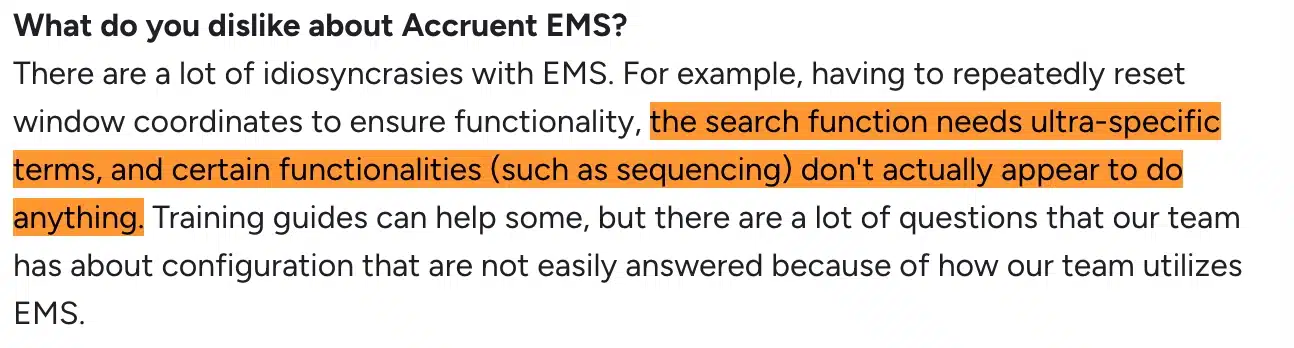
- Some of the platform’s functionalities don’t work as expected.
Verdict
Accruent EMS makes sense for large organizations with genuinely complex scheduling needs; multiple locations, high booking volumes, and resources that go well beyond just meeting rooms. Also, if your office manages events, equipment, catering requests, and room setups alongside day-to-day bookings, EMS has the depth to handle all of it from one system.
However, for standard corporate offices that mainly need to book rooms and desks, it may be too much for you. Plus, the cost, implementation time, and one-year minimum contract will feel hard to justify to higher-ups.
12. Officely — Best for Slack-First Teams
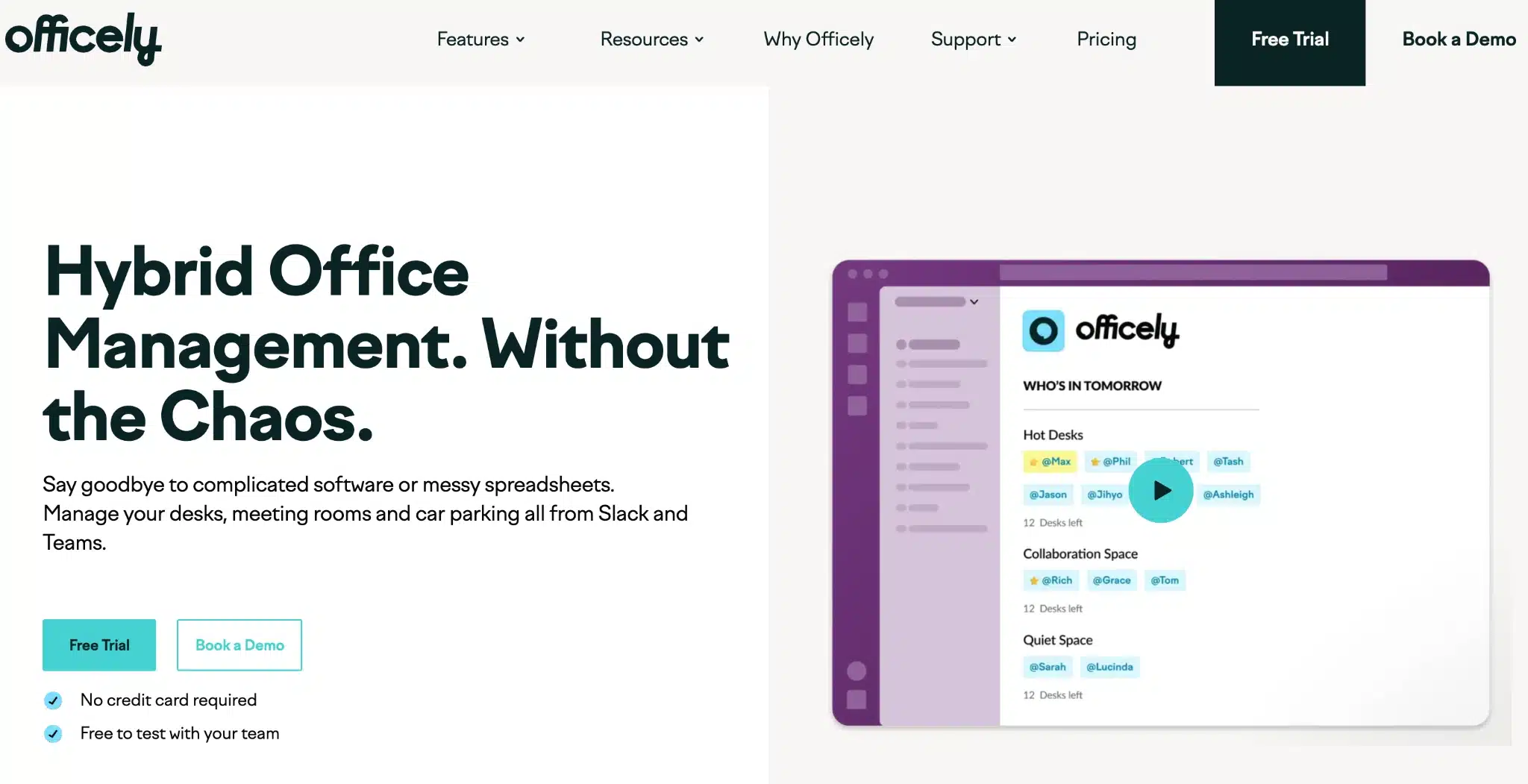
Officely is a hybrid office management that lets you manage meeting rooms and other resources like desks and car parking. A major advantage of Officely over other tools is that it works completely within the tools employees use: Slack and Teams.
This means there’s no new app to download, no separate login, and no onboarding process. Without leaving Slack or Teams, opening a separate app, or creating a new login, employees can reserve a resource in two clicks without leaving the window they are working in.
Beyond booking, Officely broadcasts who’s coming into the office each day to a dedicated Slack channel. Employees can see who’s in before deciding whether to make the commute, which makes office days more productive.
As time goes on, the system will learn the employee’s booking trend, and then will start suggesting the best days to come in based on team patterns.
That said, Officely runs on a per-user basis. As your headcount grows, so does your subscription bill—regardless of the number of resources you’re managing. That means an organization with 100 employees and 4 meeting rooms still pays the same as one with 100 employees and 1 meeting room.
Officely Standout Features
- Desk booking, meeting room booking, and parking management — all inside Slack
- Daily office visibility
- Smart office day recommendations based on team patterns
- Automatic broadcast to Slack channel showing who’s booked in for the day
- Real-time attendance tracking and usage data
- One-click booking and daily check-in prompts
Pricing
- Free: Up to 5 users
- Starter: Desk booking, unlimited users (~$2.50/user/month on annual plans)
- Premium: Everything + meeting rooms ($12/meeting space/month added)
- Enterprise: Custom
Pros
- If your team already lives in Slack or Teams, they’re already set up. Booking happens inside the tool they have open all day anyway.
- The platform helps employees organize after-work gatherings, reserve bike rack spots, and see who’s coming in — all without leaving Slack. This makes coming to the office worth it.
Cons
- Reporting capabilities are restricted. For teams that want transparent space insights across the board, that’s a gap.

- Officely was built for Slack first, so the Teams integration is still miles behind. If your organization runs primarily on Teams, you won’t get the same seamless experience as one using Slack.
Verdict
Officely is the simplest room booking entry point on this list. If adoption is your primary challenge, your team is small to mid-sized, and Slack is your daily operating environment, it’s worth a 7-day trial. For offices that need depth, multi-location support, or a complete workplace platform, you’ll outgrow it quickly.
Conclusion
The right meeting room booking software depends on what problem you’re actually trying to solve.
If your challenge is fragmentation — rooms, desks, lockers, and parking managed across separate tools — and maintenance costs, Awaio is the best fit and the only hardware-free option that covers the full stack on a single platform.
For mid-sized offices that want the best combination of features, ratings, and value, Archie and Skedda are the strongest all-rounders.
For Microsoft-first teams where Teams is the daily operating environment, YAROOMS is the standout choice. For Slack-first teams that want simplicity above everything else, Officely gets you live in a day.
For large enterprises with complex hybrid policies and real estate analytics needs, Robin and OfficeSpace offer the depth — but expect enterprise pricing to match. If your office wants the physical display experience done properly, Joan is the clear hardware leader.
Whatever you choose, prioritize the tool your team will actually use.
Ready to see how Awaio’s hardware-free approach works in practice? Book a demo to explore the platform for your office.
FAQs
What is meeting room booking software?
Meeting room booking software is a tool that lets employees find and reserve shared meeting spaces — conference rooms, focus pods, huddle rooms, and other bookable areas — through a digital interface. It shows real-time room availability, prevents double bookings, integrates with calendar tools such as Outlook and Google Calendar, and provides workplace managers with data on how their spaces are used.
Do I need hardware like sensors and room displays for a booking system to work?
No. Some platforms require hardware such as display panels outside rooms, occupancy sensors, and Ethernet cabling. But software-only solutions work well for most offices.
Awaio, for example, runs entirely on software. Any space becomes bookable via a QR code scan, employees can confirm their booking through the app, and rooms are automatically released if nobody checks in. You don’t have to install a single sensor or wall display.
Additionally, hardware-free systems deploy faster, cost less to run, and adapt easily when your office layout changes.
Does Google or Microsoft have meeting room booking software?
Both Google Workspace and Microsoft 365 include basic room booking functionality. Specifically, Google Calendar lets you add “meeting rooms” as bookable resources, while Outlook includes Room Mailboxes, which function similarly.
These native tools work for simple setups, particularly small offices where everyone shares the same calendar system. They fall short when you need check-in enforcement, auto-release for ghost meetings, booking rules by team or department, cross-domain support, or analytics beyond basic usage logs.
Conversely, dedicated room booking platforms integrate on top of Google and Microsoft. That way, your employees keep booking from the calendar tools they already use, while the platform handles the enforcement and intelligence that the native tools don’t provide.
How do I prevent ghost bookings and no-shows from blocking meeting rooms?
In Awaio, at the start of the reserved time — or a few minutes in — the system sends a check-in prompt. If nobody confirms within a set window (typically 5 to 15 minutes), the room releases automatically and becomes available for others to book.
Can a meeting room booking system handle reservations in real time?
Yes. Real-time availability is a baseline feature for every platform reviewed in this guide.
For example, in Awaio, when an employee books a room, that space immediately shows as unavailable to everyone else. When a booking is canceled or a room is auto-released after a no-show, it appears as available again instantly. This real-time sync extends to calendar tools.