


If you’re managing a hybrid workplace, you already know that coordinating who’s in the office, when, and where they’ll sit is more complex than it sounds.
On busy days, you’re scrambling to ensure fair access to desks and rooms, manually enforcing booking rules, and trying to get a clear picture of what’s actually being used across floors.
You’ve probably tried the obvious solutions:
- Google Workspace for room booking,
- Slack channels for coordination,
- Outlook calendars for tracking,
- Maybe even spreadsheets or custom scripts to fill the gaps.
But instead of simplifying operations, they create double-bookings, zombie reservations, and hours of manual oversight each week.
Dedicated hybrid workspace software solves this differently. Rather than adding another tool to manage, it automates booking, provides utilization insights, and handles resource allocation without creating administrative overhead.
In this guide, we’ll walk through 7 hybrid workplace software platforms designed to reduce your administrative workload and make hybrid operations actually sustainable.
Here’s a shortlist of the software we’ll cover:
- Awaio: Best for all-in-one workspace management for hybrid workplaces without the extra administrative hassle of hardware setups or managing multiple tools
- Archie: Best for enhancing in-office day collaboration without back-and-forth messages
- Condecco: Best for enterprise hybrid workplace management
- Flowscape: Best for organizations looking for a digital solution to manage resource sharing on peak capacity days.
- Skedda: Best for automating role-based booking privileges
- Deskbird: Best for allowing employees to self-manage compliance office attendance rather than HR policing schedules
- Envoy: Best for reducing receptionist workload in multi-tenant buildings
Awaio helps you manage all shared workspace resources—desks, meeting rooms, parking, lockers—in one software platform, without expensive hardware like terminals, kiosks, or sensors.
This eliminates the administrative overhead that typically consumes your day:
- No tool-switching: Reserve and track all resources from a single dashboard instead of coordinating across Outlook, Slack, spreadsheets, and vendor systems
- No physical key management: Digital access replaces RFID cards, key handovers, and locksmith calls
- No IT dependencies: Reconfigure layouts, add resources, or adjust permissions yourself—no cabling, no installation tickets
- No hardware maintenance: Your team focuses on workplace strategy, not troubleshooting sensors or replacing broken tablets.
As a result, companies typically reduce hybrid workplace costs by 30-50% through eliminated admin roles, reduced vendor fees, and reclaimed productivity.
Science Park Jönköping experienced this firsthand, cutting 95% of their manual administration overhead after switching to Awaio for their 500+ users across 100+ companies.
“I spent a long time searching for a system that could manage over 500 people from more than 100 companies, ensuring smooth booking of shared meeting rooms, desks, and digital keys for lockers and storage. Awaio’s smart QR code solution outside the rooms means we all have a screen in our pocket. The app also provides a clear overview of all rooms, desks, and available lockers. An efficient solution that truly works.”
Martin Harbäck
Business Developer & Operations Controller, Science Park Jönköping
Want to manage your hybrid workplace without the administrative headache? Book a demo today.
In the meantime, read on to learn how Awaio helps you:
- Reduce support requests by empowering employees to self-manage their bookings
- Prevent no-shows and scheduling conflicts with flexible booking rules
- Discover new ways to improve office space and manage bookings
Reduce support requests by empowering employees to self-manage their bookings
In most hybrid workplaces, the facilities manager fields a constant stream of questions: “Can I book the large conference room for Thursday?” “Who has the locker key?” Questions like these add up to hours of interruptions each week, consuming time that should be spent on strategic planning.
Awaio solves this by allowing employees to handle bookings themselves. With just their mobile device or PC.
From one interface, they can:
- Book resources for adhoc or future use – Scan a QR code or use the app to reserve desks, lockers, meeting rooms, or parking in seconds
- Share team lockers – Reserve one and distribute digital keys to colleagues without admin involvement
- Release unused parking – Employees with assigned spots can free them up for others when not coming in.
- Find and sit near teammates – Use wayfinding to see where colleagues are and reserve nearby desks. They can also use it to navigate the office.
That way, they handle the basics—checking availability, finding spaces, coordinating with teammates—while you analyze usage trends to right-size your office footprint and plan team zones based on collaboration patterns.
Is Outlook room booking causing your team a headache?
See how you can plan and manage Outlook meetings inside Microsoft 365 without extra plugins, panels, or hardware.
Prevent no-shows and scheduling conflicts with flexible booking rules
While employees self-manage reservations, Awaio lets you set automated booking rules to prevent issues such as no-shows, without manually verifying that booked spaces are actually occupied or responding to complaints about ghost bookings. From the administrative dashboard, you can:
- Set minimum and maximum booking lengths to stop people from reserving a meeting room for the entire day when they only need it for an hour.
- Limit how far in advance spaces can be reserved to prevent resource hoarding.
- Cap the number of active reservations per person to stop resource hogging—no more discovering that one employee has three desks booked simultaneously “just in case.”
- Require check-ins to confirm people actually show up. If someone books a space but doesn’t check in within a set timeframe, it’s automatically released for others to use.
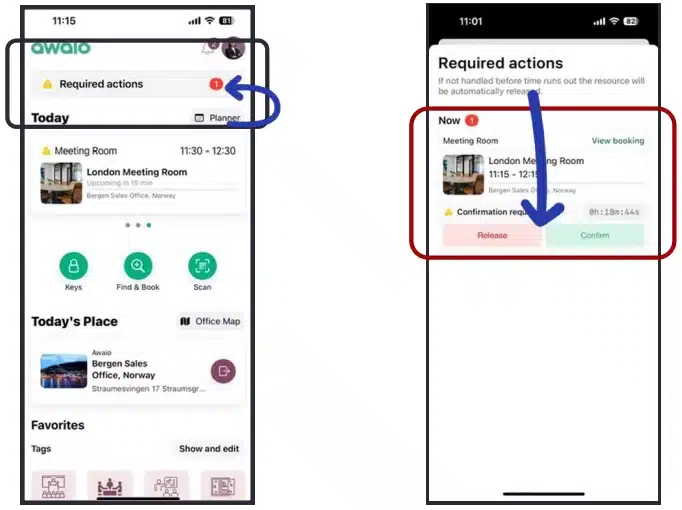
- Set priority access for specific teams or departments so critical groups get first dibs on the resources they need most, without you manually managing a waitlist.
This ensures employees use resources efficiently, preventing conflicts before they arise. Plus, you’re not spending your mornings conducting physical walkthroughs to verify whether specific resources are actually being used or just booked and remaining empty.
Discover new ways to improve office space and manage bookings
With Awaio, you can access data on how your workplace is actually being used without using external data analysis tools or switching between platforms. From the admin dashboard, you can immediately view:
- Current occupancy – Which desks, rooms, or zones are in use right now?
- Peak usage – What’s the highest number of people using a resource at once
- Utilization rate – How often is a resource used during a set period?
- Inventory overview – What’s the total number of desks, lockers, rooms, or parking spaces available?

Even better, you can easily spot patterns fragmented tools miss, such as high desk demand on Tuesdays paired with low parking use, suggesting employees carpool or take public transit.
This helps you make informed decisions on space optimization and always have current usage data ready to present to leadership whenever it’s required.
Key features
- All-in-one workplace management feature suite (desks, rooms, parking spaces, e-bike charging stations, etc.)
- Google Workplace and Microsoft 365 integration
- Flexible booking rules
- SSO login
- Real-time office space utilization data
- Hardware-free office map and wayfinding
- Mobile app
- QR code check-in
Pros
- Every reservation made through the app, web interface, or calendar integrations syncs in real time, ensuring resource availability data is always precise and accurate. That way, you don’t step in to resolve scheduling conflicts.
- Employees can sign in with their existing Google or Microsoft accounts. This eliminates the hassle of managing multiple logins and makes it easier to revoke access once they leave.
- Instead of individual messages, Awaio lets you notify everyone at once about office events through the bulletin dashboard.
- The modular pricing structure makes it affordable and scalable, enabling it to adapt to your needs.
Cons
- The visitor management module is in development.
Pricing
- Bluetooth lock: 99€/ lock
- Office map: 190€
- Room booking: 10.9€/month
- Desk management: 69€/month
- Smart parking: 69€/month
Awaio’s modular pricing structure ensures you only pay for what you need and scale as needed, without contract renegotiations or administrative-heavy reconfiguration.
Sounds like what your team needs? Contact us to identify your specific needs and help you reduce the day-to-day admin work of managing your hybrid office.
2. Archie
Best for: Enhancing in-office day collaboration without back-and-forth messages

Archie is a workplace management software that helps you manage desks and rooms, alongside visitors, in one place. In just a few clicks, employees can view available resources and book what they need via phone, desktop, or calendar integrations.
A standout feature is Archie’s social feed, which addresses one of hybrid work’s biggest challenges: maintaining connections. Teams can share updates, celebrate wins, and coordinate informal gatherings. That way, the office feels more like a community than a mere work location.
However, a major drawback of Archie is that it manages only desks, rooms, and visitors. If your workplace also needs to manage parking spaces, lockers, or other shared resources, you’ll need to add another tool to your stack. This means more time hopping between tools, managing logins, and troubleshooting issues.
Key features
- Neighborhoods
- Flexible booking rules
- Third-party integrations
- Space usage analytics
- QR code check-ins
Pros
- Managers can reserve resources for their team members, making it easier to plan collaboration.
- The data and analytics feature shows attendance patterns, helping you track the success of your hybrid work policy.
- Customers say the support team replies promptly and assists throughout the initial adjustment period.
Cons
- The application isn’t very intuitive. For example, some customers are usually logged out of the app while using it. Others say they have to wait an extra time for interfaces to load and bookings to update across systems.
- Since it only caters to desks and rooms, you’ll need an extra tool to manage other resources, such as desks and parking spaces, further increasing your workload.
- It uses a per-space pricing model, which escalates your costs as you scale.
Pricing
- Desk booking: Starts from $2.8 per desk/month
- Room management: Starts $8 per room/month
- Starter: Starts from $109 per location/month
3. Condecco (Eptura)
Best for: Enterprise hybrid workplace management
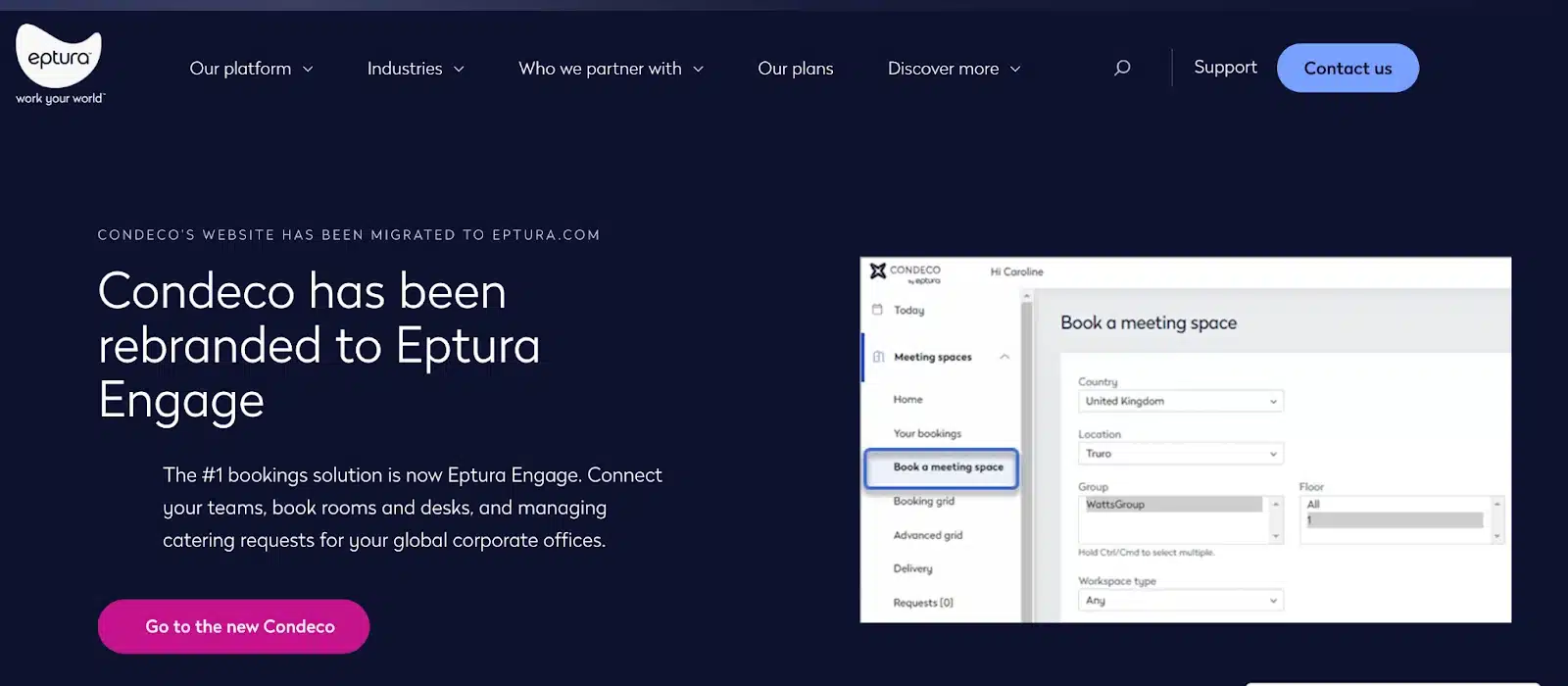
Condeco is a hybrid workplace software built specifically for large, multi-location enterprises. One standout feature is its advanced visitor management system, which gives workplace teams granular control over visitor access to specific areas and resources.
The security goes beyond basic check-ins.
Before granting entry, Condeco automatically captures visitor photos and cross-references them against international watchlists. If there’s a match, you’re immediately notified to take appropriate action—a critical feature for enterprises with strict security requirements or government contracts.
The trade-off?
While Condeco provides detailed resource utilization data and helps you manage access, it relies heavily on sensors and hardware to do so.
This means whatever you save on administrative work gets offset by the complexity and cost of installing and maintaining physical infrastructure across multiple locations.
Prefer tracking utilization data without the headache of hardware setups? Check out these Condecco (Eptura) alternatives.
Key features
- AI-powered bookings
- Workplace analytics
- QR-code check-in
- Visitor management
- Interactive floorplans
Pros
- Its AI system checks team schedules and suggests the best desk and day to maximize collaboration. Employees can accept and book in one click, eliminating the guesswork of “when should I come in?”
- If a meeting is rescheduled, the system automatically adjusts room reservations to match the new time, eliminating double-booking risks and manual updates.
- The meeting room management system suggests spaces based on scheduled meetings and availability.
Cons
- Bookings made through Outlook sometimes get moved to different rooms without notification or explanation. Workplace teams must step in to untangle the chaos it creates.
- The interactive floor plan is nearly unreadable on mobile devices, forcing employees to either walk the floor or contact workplace teams for ad-hoc meeting room bookings.
- Tracking occupancy and managing access requires complex hardware installations, which come with admin overhead.
- It requires sensor data to track occupancy and release vacant spaces.
Pricing
- Condeco’s pricing isn’t publicly available. You’ll need to contact their sales team for a quote.
4. Flowscape
Best for: Organizations that need to manage resource sharing on peak capacity days.
Flowscape is a workplace management platform designed to help organizations manage resources such as desks, rooms, and parking spaces.
What sets it apart is automated capacity management, which prevents the all-too-common problem of peak capacity (the office being overcrowded on certain days, and empty on others).
When a day reaches the pre-set maximum occupancy, Flowscape automatically blocks new bookings and redirects employees to days with availability
This hands-off approach means you’re not constantly monitoring registration numbers, scrambling to accommodate unexpected spikes, or over-provisioning resources to handle peak days.
That said, essential features like wayfinding and analytics require hardware setups. Combined with the fact that it doesn’t manage lockers, this means you’ll likely need additional tools or infrastructure to manage your workplace.
Looking to manage your office without the difficulties of hardware setups? Check out these Flowscape alternatives.
Key features
- Resource management
- Workplace analytics
- Advanced booking rules
- Automated desk check-in
Pros
- Employees can find and book desks with specific amenities (standing, dual monitors, quiet zones) for themselves or teammates.
- You can configure unique booking rules for different areas—stricter policies for premium zones, relaxed rules for hot-desking areas.
- People can reserve resources for entire workweeks at once, saving them from repetitive daily bookings.
Cons
- Core features like wayfinding and analytics require installing busy lights, sensors, beacons, and kiosk screens throughout your workplace. This adds both upfront costs and ongoing maintenance burden.
- The platform doesn’t support lockers, so if your workplace needs locker sharing or digital key management, you’ll need a separate tool and another vendor relationship.
- Detailed usage data and occupancy insights are only available if you deploy sensors across your office.
Pricing
- Flowscape’s pricing isn’t publicly available. You’ll need to contact their sales team for a quote.
5. Skedda
Best for: Automating role-based booking privileges

Skedda is a workplace management platform that helps you manage desks, meeting rooms, parking spaces, and visitors from one system.
Its standout feature is its advanced booking rules and role-based access engine, which reduces the manual enforcement you have to endure when managing privilege levels.
For instance, if your leadership team needs priority access to certain meeting rooms while the general staff books on a first-come, first-served basis, Skedda handles that automatically.
You can set rules like allowing senior staff to book four weeks in advance, while others are limited to one week. Or give specific departments exclusive access to certain zones, without you having to police reservations or field special requests.
But there’s a drawback:
Skedda’s per-space pricing model scales quickly and can become expensive as your workplace grows. Plans cap how many resources you can manage, and essential admin-reducing features—like automated check-in rules and usage dashboards—are locked behind higher tiers.
For example, the Starter plan supports only 15 spaces and lacks check-in enforcement and analytics dashboards. If you expand beyond that, each additional space costs extra, making it prohibitively expensive for mid-sized hybrid offices managing 50+ desks and meeting rooms.
Need a tool that can accommodate more resources for less? Discover more cost-effective Skedda alternatives.
Key features
- Advanced rules engine
- Interactive floor plans
- Desk, room, parking space, and visitor management
- Detailed analytics and reporting
- SSO
- Third-party tool integrations (like Slack, Microsoft 365, and Google Workplace)
Pros
- Its third-party integrations enable employees to reserve resources directly from the tools they already use: Outlook, Slack, and Google Calendar.
- Employers can use the interactive floor map with visual indicators to find resources with specific amenities such as monitors and standing desks. That way, employees can find what they need without asking you to confirm what equipment is in each room.
- Upload a rough sketch of your office layout, and Skedda’s team converts it into a professional interactive floor plan at no extra cost.
Cons
- Key features, such as check-ins, detailed analytics, and advanced resource allocation, are only available on the most expensive plan.
- With strict caps on the number of desks and rooms you can manage per tier, you’ll likely hit your limit quickly as your hybrid model scales.
Pricing
- Starter: $99/month per space
- Plus: $149/month per space
- Enterprise: $199/month per space
6. Deskbird
Best for: Empowering employees to self-manage compliance office attendance rather than HR policing schedules

Deskbird is a hybrid workplace management tool that combines resource management with social connection enhancement. With the tool, employees can reserve resources, and also check who’s in the office, plan off-work activities, and give feedback on the office experience.
One of Deskbird’s valuable feature, is how it helps organizations enforce hybrid work policies without constant manual oversight.
When setting up the system, you define your hybrid work requirements in detail: minimum office days per week, which days are mandatory versus elective, and office attendance policies for different teams or departments.
Once policies are configured, enforcement becomes hands-off. Employees can view their attendance progress and see exactly how many office days remain to meet requirements. Meanwhile, managers can verify compliance without chasing people down or manually tallying who’s meeting their commitments.
That said, Deskbird charges per active user. For smaller teams or single offices, this is manageable. But costs scale quickly as you increase headcount and add temporary staff (contractors, interns, or seasonal workers).
Need a Deskbird alternative that’s more affordable? Check out some Deskbird alternatives for hybrid workplaces.
Key features
- Resource (desk and rooms) and visitor management
- Automated hybrid policy management
- Third-party integrations
- Detailed analytics
- Interactive floor plan
Pros
- Its integration with Microsoft Teams, Slack, Outlook, and Google Calendar allows employees to book resources within the tools they already use.
- Its modular pricing approach lets you pay only for features you’ll actually use.
- Employees are automatically checked in on arrival, so you’re not manually following up or releasing desks that were booked but unused.
Cons
- On the lower plans, you can only view aggregated usage data—there are no individual or team-level filters. This forces teams to make space allocation decisions based on guesswork rather than data.
- Per-user pricing means your subscription grows every time you add employees, contractors, or interns. As such, it’s expensive for organizations with seasonal staff or rapid growth.
Pricing
- Starter: $2.80 per user/month
- Business: $2.95 per user/month
- Professional: $3.4196 per user/month
- Enterprise: Contact for pricing
7. Envoy
Best for: Reducing receptionist workload in multi-tenant buildings

Envoy is a workplace management platform designed for organizations operating or using multi-location or multi-tenant buildings.
With Envoy’s virtual front desk, a single receptionist can support several office locations remotely. Through video chat, they greet visitors, provide directions, and help employees navigate the building. This eliminates the need to staff physical front desks at every location or disturb busy employees to handle walk-ins.
For multi-tenant buildings, Envoy consolidates visitor management across multiple companies into one interface.
Each tenant gets their own branded check-in experience, separate visitor logs, and custom security preferences, while the virtual front desk manages everything from a single dashboard.
This prevents the chaos of manually juggling multiple check-in systems, visitor spreadsheets, or tenant-specific protocols.
The major drawback, however, is that Envoy doesn’t include parking, locker, or shared equipment management. If your facility needs to manage these resources, you’ll need additional systems.
Need a more complete hybrid workplace software? Check out some top Envoy alternatives to eliminate the hassle of managing multiple tools.
Key features
- Virtual front desk
- Resource (desks and rooms) management
- Advanced visitor management
- Data analytics
- Interactive wayfinding
- Third-party integrations
Pros
- Employees are automatically checked into their reserved space upon connecting to the WiFi.
- You can use the free trial to explore the tool’s capabilities before committing to a long-term subscription.
- The analytics data is very detailed, making it easier to spot utilization trends.
Cons
- Bookings made on other platforms take a while to update in the mobile app.
- Essential features like detailed analytics and a branded admin portal are only available in the most expensive tier.
- There are no tools for managing shared resources such as parking spaces and lockers.
Pricing
- Standard: $3 per active user/month
- Premium: $5 per active user/month
- Premium plus: $7 per active user/month
Find a Hybrid Workplace Software That Actually Lightens Your Workload
The right hybrid workplace tool should save you time, not create more work. If it doesn’t, you’re paying twice: once for the subscription, and again in lost productivity dealing with the tool itself. Look for a software that:
- Easy to expand or contract as your workforce changes
- Prevents no-shows and booking conflicts without requiring you to walk the floor or police reservations manually
- Consolidates everything in one place so you have access to comprehensive utilization data and avoid spending time tab-hopping.
That’s exactly what Awaio delivers. Because it’s hardware-free and works with devices your employees already use (phones and computers), there’s no complex installation, no IT coordination, and no maintenance burden.
Companies using Awaio reduce administration time by approximately 95% while ensuring employees consistently get the resources they need.
Ready to see how it works? Book a demo today, and our team will schedule a personalized walkthrough of Awaio.
Frequently Asked Questions
Are there other hybrid workplace tools?
▼
What are some cost-saving initiatives to apply in a hybrid workplace?
▼
The most effective way to cut hybrid workplace costs isn’t just reducing square footage or increasing desk-sharing ratios. It’s designing your workplace in a way that lets you scale resources up or down based on actual demand. Learn how to design a workplace that flexes with demand in our comprehensive guide on cutting hybrid office costs.