
Hybrid office design is one of the largest operational decisions a facility or workplace team will make. Generally, the goal is to optimize space and minimize waste.
Most guides on achieving this focus on desk ratios, floor plans, furniture, meeting room technology, budgets, and acoustics. And that’s understandable, since it’s the most visible and tangible aspect of a hybrid workplace.
However, the aspect that’s important, but mostly ignored, is how the entire space is managed. As such, a redesigned space that’s supposed to improve the office experience instead creates a new set of problems the facility team has to solve.
For this reason, this article covers both the physical and management layers.
We’ll explore the design principles that shape the space and the operational infrastructure that determines whether employees experience it as functional or frustrating.
What Hybrid Office Design Actually Means (And What It Replaces)
Hybrid office design means reconfiguring physical space to support a workforce that splits time between on-site and remote work.
It’s tailored for today’s offices because, unlike traditional planning with 1:1 sharing ratios, it is built to serve hybrid offices with variable attendance patterns. Someone is in on Tuesday but remote on Friday, in back-to-back meetings on Thursday, but heads-down solo work the next day.
In practice, this means hybrid office design incorporates adaptability as a key principle.
What Changes With Hybrid Office Spaces
Consider an organization that has adopted hybrid work arrangements. On days when attendance drops, it drops desk counts by roughly 30 to 50 percent. Then, the freed up space is reallocated to focus rooms, collaborative spaces, and shared resources.
Fixed seating gives way to bookable workstations, with employees reserving what they need only when they need it. This lets you right-size by reducing the total number of desks, while still ensuring that people have a place to sit on the busiest days.
The priority in the floor plan design brief also changes—from assigning territories to supporting various tasks and interdepartmental collaboration patterns. Rather than rows of identical desks, the office space designates zones for hybrid meetings, quick huddles, deep project work, and informal connections.

Hybrid office design isn’t the same as a scheduling policy.
While scheduling determines things like which days people work on-site, which teams anchor together, and what the minimum office presence should be, hybrid office design helps you set up the space to accommodate the fact that not everyone is there at once.
Principles For Designing A Hybrid Office
These principles cover the three key components (layout, technology, data) that determine whether activity-based working functions in practice. You can use them during early planning, as criteria for pilots, or as a framework when attendance patterns or team structures change.
1. Design For Activities, Not Departments
The departmental floor plan made sense when everyone was present every day, but it doesn’t anymore.
When a third of your finance team is remote on any given Tuesday, reserving a fixed block of desks for finance wastes space and limits the areas in-office employees can use. It’s a major reason why office vacancy rates are projected to exceed 20% in major cities by 2030.
If the office is to serve whoever shows up without wasting resources, the smarter move is to organise space around the specific activities that bring employees into the office:
- Workshops
- Client meetings
- A day of focused work
- One-to-ones
- Project sprints
- Hybrid meetings
- Trainings
- Informal social time
This step determines key decisions you’ll make about the office space, so it’s vital avoid guesswork. Hear directly from teams. You can interview departmental heads or run a company-wide interview using a survey template.
Download this template to get more precise information from employee interviews
Next, group these activities into a small set of repeatable zone types, each with its own noise level, privacy expectation, and expected length of stay.
For example, a focus zone might have high-backed seating, task lighting, and a clear, quiet norm. While a collaboration zone uses flexible tables, writable walls, and room for stand-ups.
Once the zones are created, append simple labels to each one and keep them consistent across floors, so people can navigate without asking. Avoid customising zones for individual departments, as it slows future changes and undermines the shared, activity-based model that the rest of the design depends on.
With this step completed, you should record a noticeable drop in sharing ratios. Companies moving to activity-based design routinely drop from a 1:1 desk-to-employee ratio to 0.6:1 or 0.7:1. The freed-up floor space funds the zones.
2. Right Size The Space With Real Utilization Data
Hybrid office design is often sold as a way to cut real estate costs. The pressure to maximise those savings leads most organisations to underestimate what they actually need.
On quiet Fridays, that decision looks justified. But on Tuesdays and Thursdays, when attendance peaks, employees often arrive to find no desks available, focus rooms fully booked, and lockers already taken.
To deliver financial savings without degrading the daily experience, base all estimates on real utilization data. Whatever the source—access cards, Wi-Fi logs, sensors, or existing desk booking tools—track the same core patterns over four to eight weeks before committing to targets:
- How many people come in each day of the week?
- Which zones fill first, and which sit underused?
- How long desks are actually occupied versus how long they sit empty?
- Which hours create the most competition for resources?
Then, test your assumptions in a pilot zone before rolling out company-wide. That way, you avoid overprovisioning based on peak-day attendance or underprovisioning based on average figures that hide how unevenly demand is distributed across the week.
Once targets are set, pair them with clear booking rules, such as:
- How far in advance can a desk or room be reserved?
- How long before an unchecked booking is released back into the pool?
These simple rules ensure the space reduction you planned for doesn’t create scheduling conflicts and poor employee experience.
3. Invest In Acoustic And Environmental Control
Most hybrid office designs concentrate more varied work types (video calls, deep focus, workshops, and informal catch-ups) into the same footprint, typically happening in close proximity.
Without a deliberate plan, noise becomes the top complaint, and poor air quality follows. Both push people back to their home offices.
Preventing these issues starts with a layout that obeys three key principles:
- Focus areas are placed away from lifts, kitchens, and main circulation routes
- Collaboration spaces are clustered where noise is expected
- Phone booths and small call rooms are positioned close to open work areas so people can step away without disturbing others
Here’s what that layout looks like in a 200-person office across a single floor:

After the layout is settled, layer on the physical infrastructure that makes the space comfortable for employees:
- In open areas, that means acoustic panels, ceiling treatments, and soft furnishings to absorb sound. Where zoning alone isn’t enough, sound masking fills the gap.
- Meeting rooms need proper doors, insulation, and reliable screens and cameras, so hybrid calls start cleanly and don’t bleed into adjacent spaces.
- Set clear standards for lighting, ventilation, and temperature, particularly in rooms booked for long sessions or focused work. Pair those standards with a room-booking system connected to occupancy sensors that adjust physical conditions based on how a space is actually used.
4. Make Wayfinding And Booking Frictionless
In a traditional office, predictability is built into the layout. Everyone knows where their colleagues sit, where the quiet room is, and where to find a free desk.
In a hybrid office, those anchors don’t exist. Without assigned desks and parking spaces, employees are never sure where to sit, where their team is, or whether there’s space for their team each day.
A digital management system for shared resources with wayfinding fills that gap. From their mobile phone or PC, employees can:
- Check live availability
- Book what they need for immediate or future use
- Navigate to each resource using color-coded digital maps
- Find where colleagues are seated
- Reserve resources from the tools they use, such as Microsoft 365 or Google Workspace, through integrations
However, the ideal system should consolidate all shared resources in one place so employees don’t have to switch between tools just to navigate a single workday. Core resources like rooms, desks, visitor spaces, parking spots, and any other shared office asset should be configured as a bookable resource.
Getting the booking experience right solves most of the navigation problems. But hybrid office design comes with trade-offs that no booking system addresses
5. Plan For The Downsides, Not Just The Benefits
Hybrid office design comes with well-documented trade-offs. For example:
- When employees no longer come into the office on the same days, spontaneous collaboration and social connections become harder to sustain.
- Aggressive desk reduction creates a scarcity on peak days.
- Coordinating schedules, especially between co-dependent teams and departments, can also become more difficult.
- While reducing desk counts can lower real estate costs, some of those savings are offset by the costs of booking systems and the operational overhead associated with shared spaces.
- When employees are left to pick in-office days, they default to the same 2-3 days. This means the office remains underutilized on most days but continues to accumulate costs.

The effects of these tradeoffs often remain invisible or are only discovered after the office experience has already begun to deteriorate. Ultimately, they show up as hidden costs or subtle frictions in the work experience employees are forced to endure.
A better alternative is to anticipate these tradeoffs during the planning phase and create strategies to mitigate them:
- Optimize team scheduling: Design anchor days into team hybrid office schedules, where specific teams commit to overlapping in-office days. This solves the challenges of peak-day scarcity, difficulty coordinating schedules, and lack of spontaneous collaboration.
- Unify booking systems: Instead of relying on fragmented tools—one for desks, another for rooms, a spreadsheet for parking—centralize resources into a single platform with minimal or no hardware overhead. That way, you cut costs and eliminate app overload.
- Reduce admin overhead: Allow employees to book what they need, check in when they arrive, and release resources they no longer use, without involving the facilities team.
Every one of these trade-offs can be anticipated and mitigated during the planning phase. However, one cannot, because it’s not related to how the entire office is managed.
The Operational Gap In Hybrid Office Design
Hybrid office designs mostly focus on renovating the space and layout, but ignore how the entire space is managed, creating an operational gap. Storage is the clearest example of this.
In a traditional 1-to-1 layout, each desk had a drawer and a filing cabinet that doubled as a small storage system. In a hybrid layout with shared workstations and a desk count that’s been reduced by 30 to 50 percent, those storage units disappear.
But teams still need a place to store shared equipment, samples, project binders, and confidential records that should not leave the building. So, employees engineer workarounds, such as stacking bags beneath desks, that erode the office experience and create security issues like personal items going missing.
The Locker Problem
Standalone locker systems are often introduced as the fix, but most are managed the same way as fixed desks. One locker assigned permanently to one person, secured by a physical key or RFID card that only that employee holds.
In a hybrid workplace where people rotate, that model creates the exact waste it’s meant to solve. Lockers sit empty on days when their assigned owner isn’t in, while employees who are in have nowhere to store their belongings.
Why This Gap Exists
This gap widens because hybrid redesigns are typically delivered by external fit-out teams whose remit ends at the physical infrastructure—acoustics, furniture, and layout. Management of the entire space, especially for storage and access, isn’t part of their brief, and rarely appears in the handover notes either.
KLP’s office real estate portfolio, which we recently audited, typifies this operational gap.
During the audit, we found that 40 percent of installed cabinets remained inactive six months after the company moved to a hybrid workplace.
Employees could see the storage, but did not know who it belonged to, how to request access, or what the rules were. From the facility side, there was no simple way to link people, roles, and locations, so no one felt safe reallocating lockers.

How Smart Locker Systems Close The Operational Gap
A smart locker system turns lockers and cabinets into shared resources you can manage digitally. Using an application, you can allocate lockers temporarily or permanently, which automatically return to the general booking pool when not in use.
For employees, they can reserve a locker alongside their desk for the day, share access with a colleague if needed, and release it when they leave. Meanwhile, every locker open and every booking becomes a data point for tracking utilization.
This closes the common management gap in hybrid offices. The workspace remains flexible, while employees still have a reliable place to store their belongings.
To implement this, you have two options:
- Purchase new lockers from a vendor providing standalone smart locker systems. This typically means procuring new cabinet hardware, paying for a separate subscription, and managing a system that sits outside your existing desk and room booking workflow. Hence, you’d expect your costs and admin overhead to skyrocket.
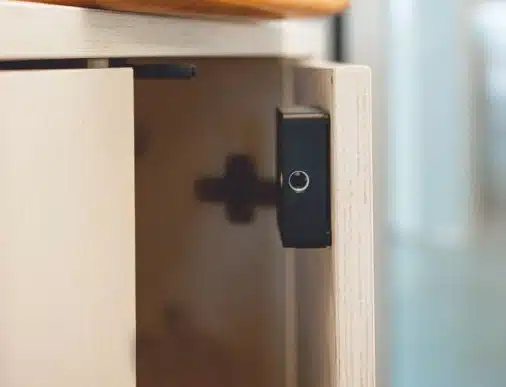
- Retrofit your existing cabinets with a Bluetooth smart lock. A compact lock mounts directly onto your current doors, drawers, and cabinets with minimal installation work. Access is managed digitally through the same platform employees already use for desk and room reservations. There’s no need to purchase furniture or complex cable setups.
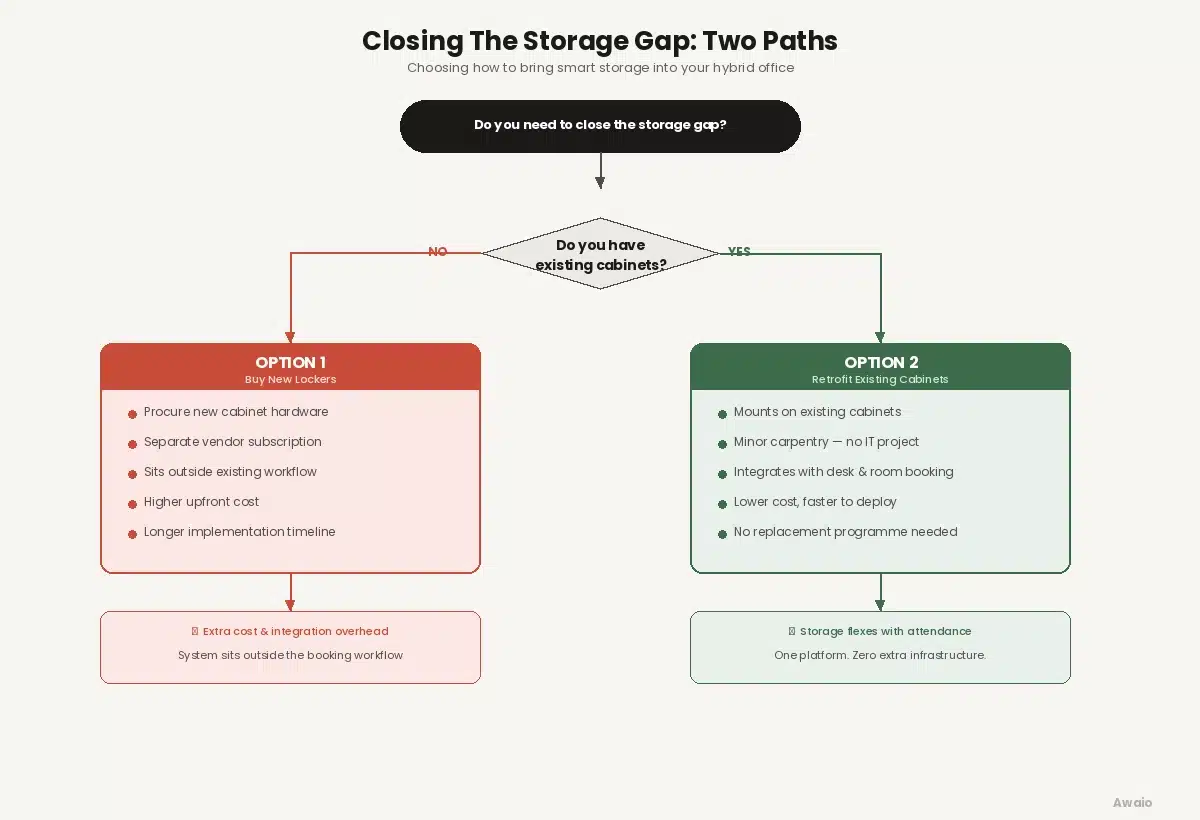
For most organisations completing a hybrid redesign, the second option is the more practical. Besides, for most organisations, the cabinets are already available. The gap is in how they are managed, not in how many there are.
A practical example of this in action is how Awaio’s smart locker system transformed KPMG Norway’s headquarters.
Awaio’s Approach And Why It Fits Existing Buildings
Awaio’s Bluetooth-enabled smart lock installs directly onto existing cabinets, without requiring complex cable setups. In minutes, with just a screwdriver and Awaio’s template, you can install it and start managing your entire locker outlay via the software.
That means older buildings with existing furniture can easily transition to smart storage units, without spending extra on extra cabinets or construction. And if you’re relocating to a new office or a new floor in a building, you can take your cabinets with you; there’s no need to uninstall complex cabling.
Even better, Awaio’s digital locks platform adapts to your current setup and security requirements by providing two options:
- Awaio BLE Lock: For environments where employees use their smartphones to access lockers with no cards, keys, or admin overhead. Suitable for all locker use cases and designed for full flexibility across a rotating workforce.
- Awaio RFID/BLE Lock: For mobile-free zones where card access is required. Employees use an RFID card or smartphone, depending on the area. Designed for organizations where admins assign lockers and security requirements restrict phone use in certain areas.
Both locks run on the same platform, allowing employees to reserve, share, and open lockers on the same platform they use for other shared resources—desks, parking spaces, and meeting rooms.
That retrofit capability matters at scale.
At KPMG Norway, 40 percent of the 1,684 cabinets and wardrobes across their 30,000-square-metre Oslo headquarters were retrofitted with Awaio smart locks rather than replaced. As a result, consultants moving between client sites and the office could book and share storage digitally—the same way they book desks.
After the retrofit, th company reported a reduction in fit-out costs by about 30%, and the office completely flexes with hybrid attendance patterns.
Norwegian Property took the same approach at Aker Brygge.
Despite operating a multi-tenant building with 325 lockers, the company reduced administrative overhead by 95% by simply moving from a conventional key-based system to awaio’s all-in-one workplace management platform.
Completing The Hybrid Office Design
Hybrid office design delivers benefits only when the space redesign is accompanied by guardrails to manage all resources.
The floor plan, furniture, and booking tools shape what people see upon arrival. But the way you manage access, storage, and booking rules determines how the entire office works.
For example, a clear layout, consistent furniture, and desk-booking software tell people which zones match which activities and where a free seat is likely to be available. But without a storage space that flexes with other resources, every change you’ve made creates a scramble for storage units. And trust in the whole infrastructure erodes.
So, in your next hybrid office design, plan space, technology, and storage policies together, and test them through pilots. That way, you’ll have a hybrid office that’s attractive and also delivers a great experience for those who use it.
Want to see how Awaio helps you implement a hybrid office design that works?