


With hybrid work, employees now experience the workplace as one connected ecosystem. Where they’ll sit, which colleagues they’ll work near, which rooms they’ll use, and where they’ll store belongings all form a single, continuous workflow—not separate categories of activity.
But the systems that support this workflow haven’t kept up.
Inside most organizations, the workplace is still managed through four or more separate tools, each with its own vendor, data model, hardware, and support process. The effects are subtle at first: an extra app to check, another login to remember, another interface to learn.
But fragmentation compounds quickly, creating app overload for employees and quietly draining millions each year through redundant licensing, duplicated devices, integration maintenance, and lost productive time.
To understand why organizations still waste hundreds of millions of dollars annually due to workplace app overload, we need to look at the procurement logic that made sense for decades— and what changed.
How We Got Here: Two Assumptions Made Sense — Until Work Changed
For years, workplace leaders relied on a simple assumption: tools that specialize in one function deliver better results than broader platforms. So organizations bought dedicated systems for rooms, desks, lockers, and parking—each optimized for a single resource and deeply aligned with how the workplace operated at the time.
Two conditions made this approach entirely rational:
- First, employee behavior was stable and predictable. People worked from assigned desks, used familiar meeting rooms, and followed consistent daily patterns. There was no need for different systems to coordinate with one another.
- Second, the software market itself reinforced specialization. Vendors built deep, single-function tools because enterprises demanded reliability within each resource category, not integration across them.
From this emerged a second assumption: the department responsible for a workplace resource should also own the system that manages it. Facilities teams chose parking and access tools, IT selected room booking platforms, and office managers handled locker solutions. Ownership mirrored the organizational chart, and it worked.
This model created clarity, accountability, and strong performance within each individual resource. The department closest to the problem chose tools best suited to the resources it managed. For a long time, it was the right structure.
But the workplace no longer operates in independent segments. And as hybrid work and employee behavior shifted, the assumptions that once ensured reliability began creating an entirely different set of challenges.
The Hidden Costs of a Fragmented Hybrid Workplace Management System
Even though each workplace system was purchased with good intentions, fragmentation creates a structural tax that compounds across every dimension of workplace operations. Its effects are most evident across four areas.
1. Complexity cost
Fragmentation multiplies complexity faster than functionality. Each system brings its own hardware footprint, data model, support queue, and vendor relationship.
Instead of a single backbone supporting the workplace, organizations end up with parallel tech stacks that require separate maintenance, updates, and integrations.
Across large enterprises, we consistently see the same pattern:
- Room systems run on their own screens, sensors, and gateways
- Desk systems rely on separate sensors and mesh networks
- Lockers require independent access modules
- Parking uses RFID readers and building-access integrations
Each tool solves a genuine need. But together, they create a level of operational overhead that grows exponentially with every additional system.
Hardware expenses, duplicated infrastructure, and admin overhead can amount to almost $250,000/year in a typical organization with 1000+ employees.
| Typical Tool Used | Hardware / Integration & Annual Licenses | Notes |
| Room-booking app | $12,000–$18,000 | Includes device maintenance + license |
| Desk-booking system | $15,000–$25,000 | Based on ~$20–$25 per employee |
| Smart-locker software | $10,000–$15,000 | Key resets and support hours included |
| Parking management app | $8,000–$12,000 | Integration + enforcement time |
| Stand-alone access system | $10,000–$20,000 | ~$10–$20 per user annually |
| Administration costs | ||
| 2 full-time IT specialists | $140,000/year | Two specialists @ ~$74,000 each for setup, configuration & upkeep |
| Admin & troubleshooting labor | $16,200/year | $54/hour × 60 hours of tickets × 5 systems = 300 hours × $54 = $16,200 |
| Total | ≈ $55,000–$90,000 (licenses) + $140,000 + $16,200 | ≈ $211,200–$246,200 per year |
What begins as one extra app quickly becomes additional devices, more network endpoints, more compliance surface, and more administrative hours.
This complexity is the foundation upon which the next set of costs is built.
2. Productivity cost
Complexity at the system level becomes friction at the employee level. In addition to an already disconnected stack of work tools, hybrid workers must manually coordinate tasks that should feel integrated: checking where teammates are, finding a nearby desk, booking a room, confirming parking — all in separate interfaces that do not share context.
Research consistently shows the impact:
- Employees lose the equivalent of several working weeks (62 days) each year to app switching (RingCentral),
- As much as 40% of productive time is lost to context switching (Harvard Business Review),
- More than half of a typical workweek is lost to coordination rather than skilled work (Asana Work Index).
Microsoft’s latest Work Trends Index reports rising digital exhaustion tied directly to tool fragmentation in hybrid environments.
Across a mid-size or large organization, these minutes compound into hundreds of thousands of lost productive hours annually, eroding the very KPIs finance leaders track: utilization, productive capacity, and output per employee.
Productivity loss is visible — but it is only the surface-level cost. The much larger financial impact comes from the decisions leaders make because fragmented systems obscure how the workplace is actually being used.
3. Real-estate & resource misallocation
In a fragmented system, room systems measure booking activity, desk systems measure check-ins, and parking systems measure gate access. Individually, the data looks sensible. Together, they hide large amounts of avoidable waste.
Common patterns across enterprises show how easy it is for well-meaning leaders to make expensive decisions based on incomplete visibility:
- Rooms appear 90% booked, leading to renovation proposals — but cross-resource data often shows a majority of these meetings are virtual and the rooms sit empty.
- Desks appear 40% utilized, implying sufficient supply — but demand spikes occur Tuesday through Thursday, revealing excess capacity on the other days.
- Parking appears 95% full, suggesting additional spaces are needed — but underlying data often shows the same small group of employees uses it daily.
When systems don’t talk to each other, leaders cannot see patterns in the overlaps, which is precisely where the real savings sit. A facilities director hearing constant complaints about room scarcity and seeing a 90% occupancy metric will naturally conclude expansion is needed.
In high-cost markets like New York, with an average build cost of $5,000 per m², acting on isolated room-occupancy data can easily trigger six-figure buildouts when you factor in build costs, AV equipment, furniture, and ongoing operating expenses.
| Cost Component | Calculation | Amount (USD) | Notes |
| Room size | 10 m² × 2 rooms = 20 m² | — | Two small meeting rooms |
| Construction & fit-out | 20 m² × $5,000 per m² | $100,000 | NYC small-room buildout average |
| AV & display hardware | $8,000–$12,000 per room × 2 | $16,000–$24,000 | Screens, conferencing hardware |
| Furniture | $3,000–$5,000 per room × 2 | $6,000–$10,000 | Table, chairs, whiteboards |
| Annual operating costs (cleaning, HVAC, maintenance) | $80–$100 per m² | $1,600–$2,000 per year | Recurring cost for additional space |
| Total cost | $123,600–$136,000 |
When a majority of ‘high occupancy’ bookings turn out to be virtual meetings taken from desks, the renovation budget effectively goes to waste.
Organizations are not blind to these cost drains. Many have attempted to reduce tool sprawl to lower operational costs, productivity, and carbon costs. But, in most cases, these attempts have been unsuccessful.
Why’s this the case?
Why Traditional Fixes Haven’t Solved The Problem
Most organizations that have identified the rising cost of fragmented workplace systems haven’t ignored it. In fact, nearly every enterprise we’ve reviewed has attempted some combination of familiar solutions:
- Integrating tools through middleware,
- Strengthening procurement controls,
- Training employees to navigate multiple interfaces, or
- Building unified dashboards to improve visibility.
These interventions often deliver short-term relief—lower ticket volume, cleaner data, marginal productivity gains. But the impact rarely lasts.
Costs and complexity reliably return to 85–100% of the original baseline because each intervention shares the same limitation: they operate on top of fragmentation, not underneath it.
Three structural realities explain why.
- Integrations can’t resolve architectural mismatches: Middleware connects systems that were never designed to share context or data structures. As each system evolves, integrations require constant monitoring, patching, and rework. Instead of removing complexity, they become a new layer to maintain.
- Workflow training optimizes an inefficient model: Employees may learn to switch between five systems more efficiently, but they still switch between five systems. Every interface update, vendor change, or policy shift resets the learning curve—eroding whatever gains training briefly delivered.
- Dashboards improve visibility, not coherence: Unified reporting tools pull data into a single view, but they cannot reconcile the underlying fragmentation. Leaders still receive activity data in isolation—desk data without parking context, room activity without team scheduling—making it difficult to see patterns that emerge only when systems operate as one.
The common thread is that these fixes address symptoms created by fragmentation, not the structural conditions that gave rise to it. They reduce costs temporarily, but never eliminate the underlying forces that recreate complexity.
Which raises the real question: What operating model prevents fragmentation from forming in the first place?
What a Modern Workplace Operating Model Must Look Like [5 Principles]
To escape the recurring cycle of fragmentation, organizations need an operating model that aligns workplace systems with how employees actually use the office: as one connected ecosystem. A modern model isn’t defined by choosing an all-in-one platform alone. The principles governing how that platform is selected, structured, and operated are equally important.
Five principles matter most.
Principle 1: Single accountability.
In most of the high-performing workplace organizations we’ve reviewed, a single senior leader holds end-to-end accountability for the entire workplace ecosystem — rooms, desks, lockers, parking, access, and the policies that govern them. This mirrors the governance model used in other complex enterprise systems, such as cybersecurity or corporate real estate, where fragmented ownership would create unacceptable risk and inefficiency.
More so, centralized accountability doesn’t remove expertise from functional teams. Facilities still defines room-booking rules, IT manages provisioning, and Security sets access protocols. The shift is that all decisions flow through one governance point, ensuring that local decisions align with the needs of the entire workplace, not just the objectives of one department.
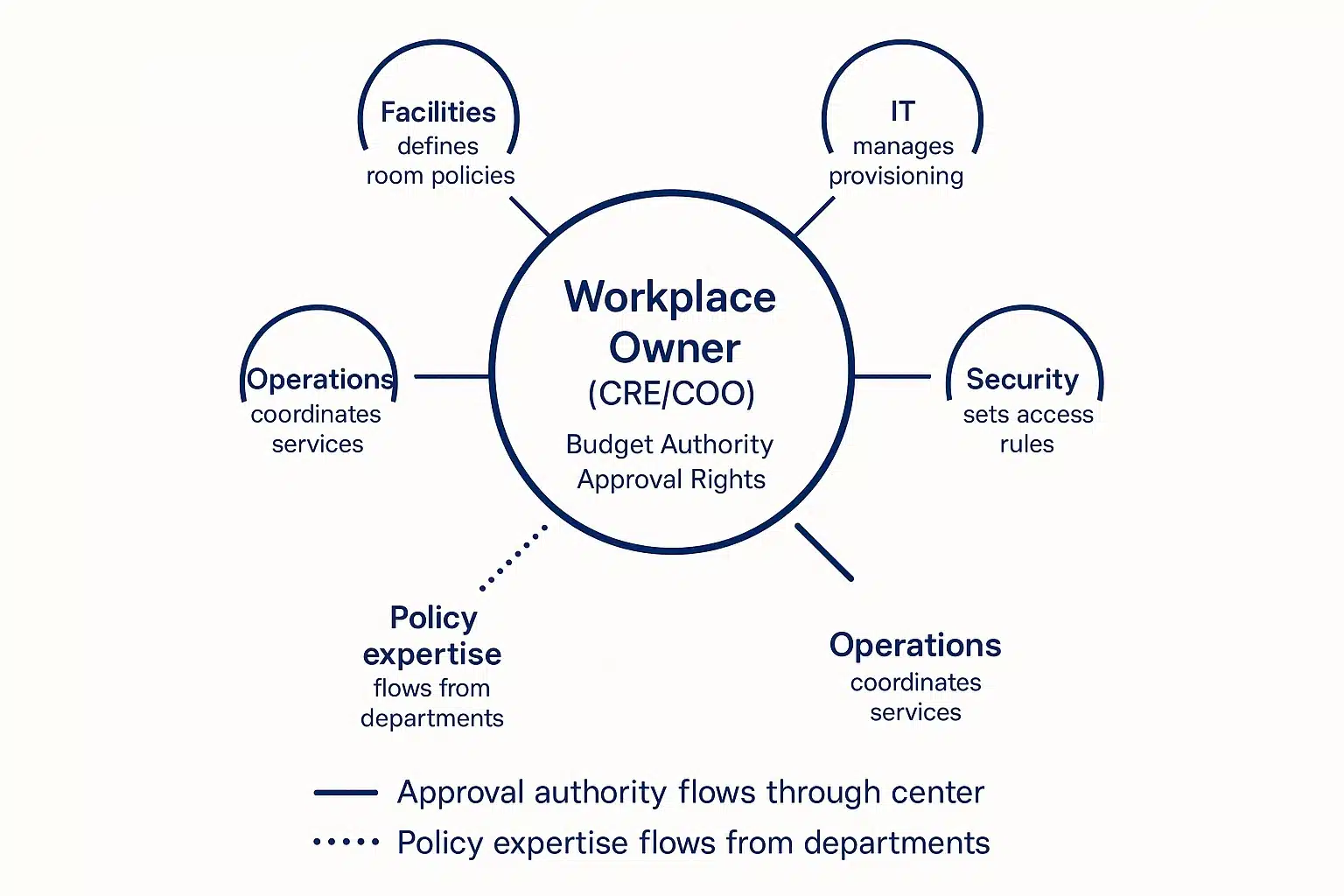
This is the structural change that prevents the most common failure mode across fragmented workplaces: Local optimization creating global inefficiency. When ownership is unified, the workplace finally behaves like the system employees already experience — coherent, coordinated, and consistent from end to end.
Principle 2: A unified employee journey
A modern workplace operating model aligns with how employees interact with the office. That means its functionalities cover all resource types, so employees can complete their entire resource booking flow in one place:
- See which teammates are on-site. Employees should instantly know which teammates will be in the office—without switching to Slack, Teams, or separate scheduling apps.
- Check resource availability. Desks, rooms, parking spots, and lockers should update live in one interface.
- Review office events. Everything—town halls, trainings, and team days—should be visible in one place so employees can plan their day.
- Book every resource they need in a single flow. Booking desks, parking spaces, meeting rooms, and lockers shouldn’t require four apps
- Unlock secured spaces with the same system. The same system should let employees unlock the garage, open parcel lockers, check into rooms, or access storage—using the devices they already carry.
I’ve seen companies immediately unlock significant cost savings from this approach. Employees who previously spent 8-12 minutes per visit navigating four disconnected systems complete the same process in 90 seconds.
If you want a clearer picture of what this could mean for your own office, review our detailed guide on reducing costs in offices.
Principle 3: One data layer for the entire workplace
A modern operating model eliminates data blind spots through a single, unified data layer that captures how the workplace functions end-to-end. When room, desk, access, and parking data coexist in the same model, organizations unlock the insights that fragmented systems inherently obscure:
- Whether room bookings translate into actual occupancy
- How demand shifts across the week and across teams
- Where space is overbuilt relative to real behavior
- Which resources create bottlenecks or ghost usage
Attempts to replicate this through BI dashboards or stitched-together reports are helpful for historical analysis, but they rarely produce real-time coherence. The systems underneath remain separate, and so do the operational realities they describe.
- The data arrives one or two days behind, which means the insights are always slightly out of sync with what employees are experiencing now.
- Each system structures its data differently, so teams end up cleaning, mapping, and re-joining spreadsheets before anything useful appears.
- Every reporting refresh requires validating that data sources are current and mappings haven’t broken.
That’s why we believe that unified data is more about shared context than aggregation. Shared context is the prerequisite for confident, high-quality workplace decisions. Without it, even the most sophisticated analytics cannot overcome structural fragmentation.
Principle 4: System-wide reduction of friction.
The old operating model creates friction by design—too many tools, too many logins, too many devices, and too many vendors. If the replacement doesn’t materially reduce these friction points, it’s not an upgrade; it’s a new interface hiding the same complexity underneath.
To do that, the system you choose must:
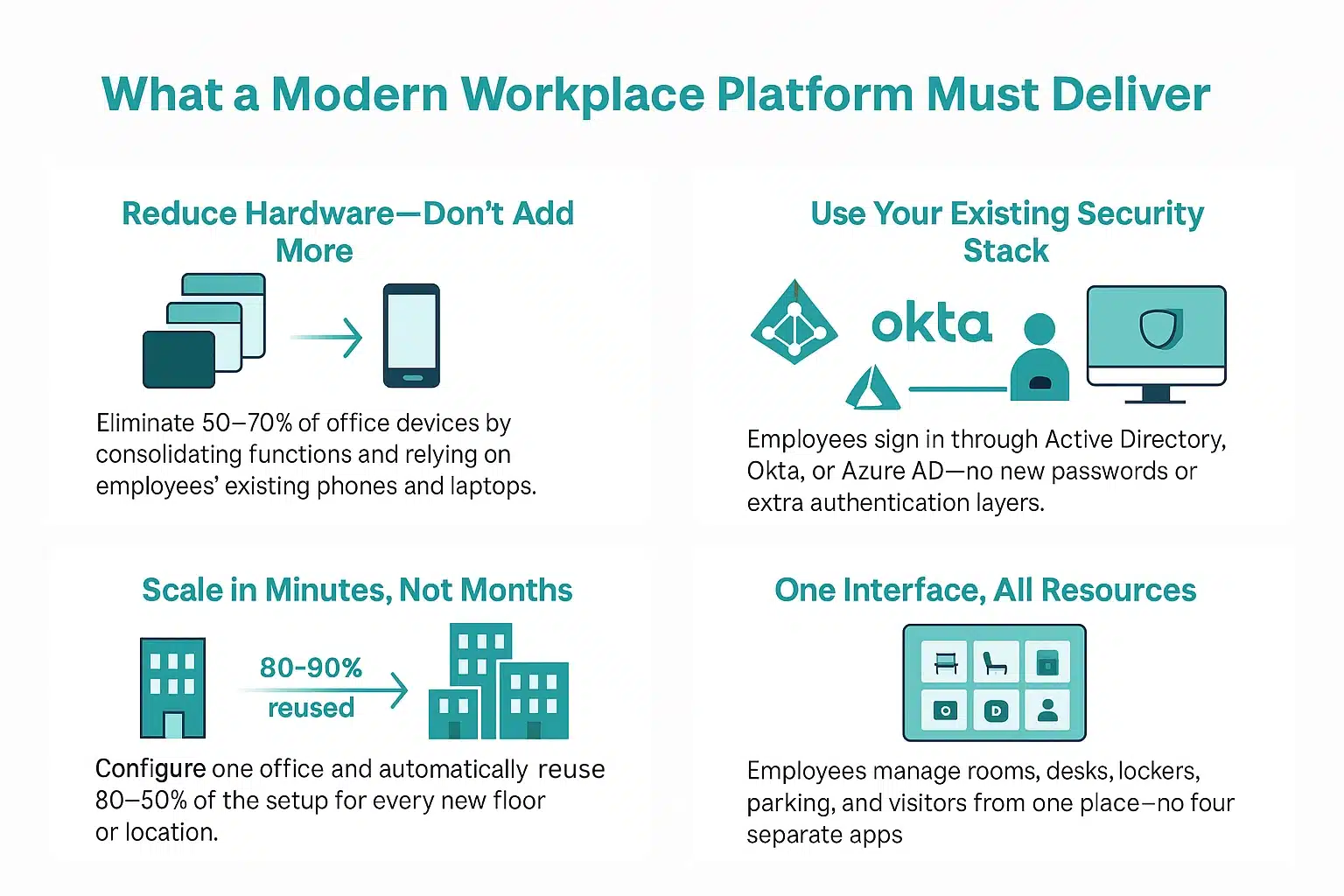
- Reduce hardware footprint, not expand it. At a minimum, the system should eliminate 50–70% of physical devices by consolidating infrastructure. But ideally, it should rely entirely on existing employee devices—phones and computers—without adding new hardware.
- Integrate into existing identity and security stack. Employees should be able to sign in through Active Directory, Okta, or Azure AD—no new passwords, no separate user stores, no extra authentication overhead for IT.
- Scale across multiple locations. The setup should be simple enough that once you configure one office, 80–90% of that configuration carries over to every new floor or city. That means you’re not rebuilding the system from scratch each time
- Minimize interface switching. Employees should manage all workplace resources—rooms, desks, lockers, parking, visitors—from a single interface. Not four apps or scattered dashboards.
This principle aligns the workplace with the broader direction of enterprise technology. Identity, security, and collaboration platforms have all consolidated around unified experiences because the cost of distributing complexity across dozens of tools is no longer sustainable.
Principle 5: Reduce carbon emissions
The old operating model increased carbon emissions. Every additional workplace system brings its own physical footprint—screens, sensors, gateways, RFID terminals, and the network infrastructure needed to support them—that creates an energy load.
The new operating model consolidates systems and minimizes device footprints, which reduces the energy consumption that influences your ESG performance. This matters especially because of the European Union’s stringent ESG requirements, which require companies to mitigate their environmental impact.
Our audits across enterprise portfolios show that even a modest 100-employee office can reduce its emissions by up to 39% simply by moving from four or five fragmented systems to a unified platform with a shared hardware footprint.
| Resource | Fragmented Setup | Annual Energy Use (kWh) | Annual CO₂ (kg) | Unified Setup |
| Meeting Rooms (2) | 2 displays + independent network endpoints | 170 kWh | 40 kg | 625 kWh |
| Desks (60) | 60 sensors + 4 gateways + separate wireless mesh | 400 kWh | 93 kg | |
| Lockers (10) | 10 access modules | 55 kWh | 13 kg | |
| Parking (10) | 2 RFID terminals | 395 kWh | 92 kg | |
| Total | 1,020 kWh | 238 kg CO₂ Using the EU’s conversion factor of 0.233 kg CO₂ per kWh |
145 kg CO₂ |
Energy estimates are based on manufacturer specifications and usage audits from over 40 enterprise portfolios. Unified platform figures assume a shared gateway infrastructure while delivering the same functionalities.
The Mindset Shift Leaders Need to Make
Taken together, these principles redefine how the workplace must operate: not as a set of independent systems managed by different departments, but as a unified environment with shared ownership, shared data, and a coherent employee journey.
This shift has a direct implication for leaders evaluating workplace platforms. The next task is to reframe the evaluation process around alignment, not functionality. Not “What features does this tool offer?” but “Does this platform support the structural coherence our workplace requires?”
This — the only approach capable of preventing fragmentation from re-emerging over time.
administration has decreased by up to 95%, Norwegian Property Group
16,000-square-meter state-of-the-art office designed to support a hybrid workforce of 800+ employees.
Organizations that adopt this model are already seeing meaningful gains. The data is clear:
- At BIR Bergen, moving to a shared-locker setup with Awaio unlocked flexible storage solutions and reduced locker-management overhead.
- Itera saw a significant improvement in employee experience after giving their teams one platform to book all the resources they need and easily locate colleagues.
- DNB freed up the equivalent of 4 full-time support roles, all while improving the employee arrival experience.
Norwegian Property Group, housing thousands of employees from various companies, reduced administration by 95% while still ensuring spaces are better utilized.
If you want to apply the same principles and experience these results, check out Awaio or book a demo to get a personalized walkthrough of how you can eliminate tool sprawl with the hardware-free, all-in-one workplace management platform.


